USA Visa Photo (Online Alternative)
Upload a photo taken at home. Verified against 2026 State Department visa requirements. DS-160 optimized JPEG under 240KB included. Print-ready 4x6 template for immigrant visa interviews.
- DS-160 ready — under 240KB
- Immigrant visa printed format
- DV Lottery compliant
- No AI face alteration
- $9.99 — no hidden costs
- 100% acceptance guarantee


Drag to compare before vs after
Photo Specifications
Will my photo be accepted?
Size
2x2 in
Lighting
No shadows
Focus
Sharp & clear
Background
White or off-white
Head height
1–1⅜ in (25–35 mm)
Recency
Last 6 months
Online submission
Printable
How It Works
1. Upload Your Photo
Take a photo with your smartphone or webcam, or upload an existing image.
2. Image Processing
We remove the background, crop to exact specifications, and check against compliance.
3. Download & Print
Get your digital photo instantly, plus a print-ready PDF with cut guides.
The State Department states directly on travel.state.gov: "We recommend you use a professional visa photo service to ensure your photo meets all the requirements." A photo problem on a visa application does not signal a weak case, but it delays it, and delays at the wrong moment can mean a missed interview date, a rescheduled consular appointment, or a trip that cannot happen. This page covers everything: the three different submission routes and what each requires, the technical specification that most guides get wrong (the DS-160 portal has a 240KB file size cap that most guides do not mention), the DV Lottery reuse ban that causes automatic disqualification, and the specific items the State Department explicitly lists as prohibited that you may not expect.
Three routes, three different requirements
US visa photo requirements depend on which application route you are using. These are not minor variations — they are different submission methods with different formats.
| Route | Submission method | Photo requirement | |---|---|---| | Nonimmigrant visa (DS-160 / DS-1648) | Digital upload during the online application form. | Square JPEG, 600x600 to 1200x1200 px, maximum 240KB. Some embassies also require one printed 2x2 at interview. Check your post's instructions. | | Immigrant visa (DS-260) | Two identical printed 2x2 inch photos brought to the consular interview. | Glossy or matte photo paper. Both prints must be identical, in color, taken within last 6 months. | | DV Lottery entry (DS-5501) | Digital upload as part of the electronic entry. | JPEG only. Exactly 600x600 pixels. Maximum 240KB. Strict technical enforcement. Photo reuse causes automatic disqualification. | | DV Lottery selectee interview | Two identical printed 2x2 inch photos brought to the consular interview. | Same printed photo rules as immigrant visa. |
PassportApp provides: a digital file optimized for the DS-160 portal (square JPEG, compressed to the 240KB limit), plus a print-ready 4x6 template with four 2x2 photos for immigrant visa and DV Lottery selectee interviews. One purchase covers both formats.
US visa photo specifications 2026
Source: US Department of State, travel.state.gov/content/travel/en/us-visas/visa-information-resources/photos.html
| Requirement | 2026 State Department specification | |---|---| | Printed size | 2 x 2 inches (51 x 51 mm). Square format. | | Digital size | 600x600 to 1200x1200 pixels. Must be square (equal width and height). | | File format | JPEG only for digital submissions. sRGB color space. | | File size cap | 240KB maximum for DS-160 and DV Lottery digital uploads. | | Head height | 1 to 1-3/8 inches (25–35mm) from chin to top of head. 50–69% of image height. | | Eye position | 1-1/8 to 1-3/8 inches from bottom of the photo. | | Background | Plain white or off-white. No shadows, textures, patterns, or gradients. | | Expression | Neutral expression. Both eyes open. Mouth closed. No teeth visible. | | Glasses | Not permitted. Medical exception requires signed statement from a doctor. | | Head coverings | Not permitted unless worn daily for religious or medical reasons. Signed statement required. | | Hearing devices | Permitted if normally worn. Headphones, AirPods, and wireless earbuds are not permitted. | | Recency | Taken within the last 6 months. Must reflect current appearance. | | AI alteration | Not permitted. Background removal is accepted. No facial editing, filters, or skin smoothing. | | Vending machine booths | Explicitly excluded by State Dept as a risk category for visa photos. |
The 240KB file size cap: the specification most guides miss
Most US visa photo guides say the digital image must be between 600x600 and 1200x1200 pixels. This is true. What they do not say is that the DS-160 portal and the DV Lottery entry system both have a 240KB maximum file size. This creates a specific, common technical failure: an applicant takes a high-quality photo on their phone, it easily clears 1200x1200 pixels, but the file is 2–3MB and the portal rejects it.
The practical implication is significant. A 1200x1200 JPEG at standard quality produces a file well above 240KB. A 600x600 JPEG at good quality typically falls under 240KB. The correct approach is to export a well-compressed JPEG at or near 600x600 pixels, check the file size before uploading, and not assume that meeting the pixel range automatically means meeting the file size requirement.
PassportApp exports:
a file specifically optimized for the DS-160 240KB limit. The export is a clean JPEG at the correct square dimensions, compressed to meet the portal requirement without introducing visible compression artifacts.
Do not upload a phone screenshot of your photo. Screenshots often have incorrect dimensions, extra borders from the screen frame, or platform compression that introduces artifacts. Always use the original photo file.
DV Lottery: the strictest photo verification of any US visa program
The Diversity Visa Lottery has requirements that go beyond the standard visa photo rules in two important ways, and both cause automatic disqualification rather than a correctable rejection.
Facial recognition reuse detection:
The DV Lottery uses facial recognition software to detect duplicate entries across years. This means reusing a previous DV Lottery photo from any previous year, even a fully compliant one, results in automatic disqualification. You must submit a new photo for every year you enter. The software detects the same image even if the file has been resized or slightly modified.
The 240KB cap is especially strict for DV Lottery:
The DV Lottery entry system requires exactly a square JPEG image, with a maximum file size of 240KB. The program's automated processing rejects images that exceed this limit without notification. Unlike some DS-160 submissions where a human officer may review the application regardless of a photo issue, DV Lottery entries with non-compliant photos are disqualified by the automated system at the time of entry.
DV Lottery selectee interview:
If you are selected in the DV Lottery, you will be required to bring two identical printed 2x2 inch photos to your immigrant visa interview at the consulate. The same printed photo rules apply as for any immigrant visa interview: glossy or matte photo paper, identical prints, in color, taken within the last 6 months.
[INFO]DV-2027 update: From April 10, 2026, DV Lottery entrants must upload a passport scan alongside their photo as part of the DS-5501 entry form. The photo specification (600x600 JPEG, maximum 240KB) is unchanged. Ensure you have a valid passport before entering.[/INFO]
What the State Department says about professional visa photo services
"We recommend you use a professional visa photo service to ensure your photo meets all the requirements." Source: US Department of State, travel.state.gov/content/travel/en/us-visas/visa-information-resources/photos.html
This is a direct recommendation from the State Department's own visa photo requirements page, not marketing language. The State Department also notes explicitly that their own free photo tool "is intended for photo cropping only" and does not check compliance: "A Department of State employee will make the final decision whether your visa photo is acceptable or not for your application."
The practical message is clear: getting a photo that meets all technical, visual, and file-format requirements is complex enough that the government issuing the visa recommends using a service rather than doing it yourself. The free photo tool helps with cropping. It does not validate compliance, check file size against the 240KB cap, or verify head position against the 50–69% requirement.
Why US visa photos are rejected: causes specific to visa applications
| Cause | Why it fails | Fix | |---|---|---| | Wrong background | Cream, grey, light blue, or any color other than white or off-white is rejected. The most common single rejection cause. | White or off-white only. No textures, shadows, or gradients. | | File too large for portal | File exceeds 240KB for DS-160 or DV Lottery uploads. | Export as JPEG at 600x600 px optimized for the 240KB cap. | | Non-square image | DS-160 portal requires exactly square pixel dimensions. A 600x750 px image is rejected. | Equal width and height. Use a tool that exports square format. | | Vending machine booth photo | State Dept explicitly excludes "vending machine" photo booths as a risk category. | Use a professional service or take your own photo with a person holding the camera. | | Headphones or wireless earbuds | AirPods, Bluetooth earpieces, wireless earbuds are explicitly prohibited. | Remove all wireless audio devices before the photo. | | Glasses | Not permitted since November 2016. | Remove all glasses. | | AI-altered appearance | Beauty filters, skin smoothing, face editing. Zero tolerance. | Turn off all phone processing before taking the photo. | | DS-160 "X" failure mode | Digital upload failed silently; confirmation page shows X instead of photo. | Always bring a printed 2x2 to your interview as a backup. | | Shadow on face or background | Overhead or directional lighting creates shadows flagged by facial recognition software. | Face a window. Stand several feet from the background. |
Hearing devices are permitted. Headphones are not.
The State Department visa photo requirements include an explicit exception that many guides miss and that surprises applicants who wear hearing aids. The exact wording from the primary source:
"If you normally wear a hearing device or similar articles, they may be worn in your photo."
This applies to hearing aids worn in or around the ear as part of everyday life. The exception covers both in-ear and behind-the-ear hearing aids, cochlear implant processors worn externally, and similar medically necessary devices.
What is not covered by this exception: wireless earbuds (AirPods, Galaxy Buds, and similar), Bluetooth earpieces, headphones of any kind, or any wireless audio device. The State Department explicitly lists "headphones, wireless hands-free devices, or similar items" as not acceptable in photos. The distinction is between a medically worn hearing device and a discretionary audio device.
Change of appearance: when you need a new photo, when you do not
The State Department specifies on its visa photo page when a significant change in appearance requires a new photo to be submitted, even if an existing photo is not yet six months old.
Changes that require a new photo:
- Significant facial surgery or trauma that changes the visible structure of the face.
- Addition or removal of numerous or large facial piercings or tattoos.
- Significant weight loss or gain that substantially changes facial appearance.
Changes that do not require a new photo:
- Growing or shaving a beard or mustache.
- Coloring or changing the style of hair.
- Normal aging.
- Minor changes in children under 16 who grow and change appearance quickly.
The governing principle from the State Dept: "Generally, if you can still be identified from the photo in your visa application, you will not need to submit a new photo." The biometric system needs to be able to match the photo to your appearance at border inspection. Normal variation is accommodated; structural changes are not.
Babies and toddlers
The same 2x2 inch specification applies to babies and children. Every person applying for a US visa needs their own photo, regardless of age. The State Department provides specific guidance for photographing infants:
- No other person should appear in the photo.
- The child should be looking at the camera with eyes open (unlike passport photos, the visa requirement expects eyes open even for infants).
- Lay the baby on a plain white or off-white sheet.
- Use a white blanket or sheet to cover a car seat if necessary to create a plain white background.
- Photograph from above.
- Ensure no adult hands, arms, or body parts are visible in the frame.
[INFO]US visa photo rules for infants differ from US passport photo rules: visa photos require eyes open even for infants. Passport photos allow eyes not entirely open for very young babies. If you need photos for both documents, the eyes-open requirement for the visa photo is the stricter standard — a photo that passes the visa standard will also pass the passport standard.[/INFO]
Printing photos for your immigrant visa or DV Lottery interview
For DS-260 immigrant visa and DV Lottery selectee interviews, you are required to bring two identical 2x2 inch printed photos. Download the PassportApp print-ready 4x6 template, which contains four 2x2 photos pre-arranged with cut guides, and print it at any standard photo service.
| Option | 2026 price | Notes | |---|---|---| | Walmart Photo | ~$0.16 per 4x6 print | Cheapest option. Same-hour pickup. One 4x6 sheet gives you four 2x2 photos. | | CVS Photo | ~$0.38 per 4x6 print | Same-day pickup. Upload online, collect in store. | | Walgreens Photo | ~$0.39 per 4x6 print | Same-day pickup. | | FedEx Office | ~$0.35–$0.49 per 4x6 print | Good for urgent same-day printing. | | Home printer (photo paper) | ~$0.10–$0.25 per sheet | Use glossy or matte photo paper. Not regular printer paper. |
[TIP]When uploading your 4x6 template to any print service, select "actual size" or "do not zoom to fill." If the service crops or scales the image to fill the paper, the 2x2 photos will be the wrong size. Confirm "actual size" before placing the order.[/TIP]
Paper requirement: The State Department requires photos on glossy or matte photo-quality paper. Not regular printer paper, not a photocopy, and not a laser print on standard paper.
Other United States Document Photos
How to Prepare Yourself
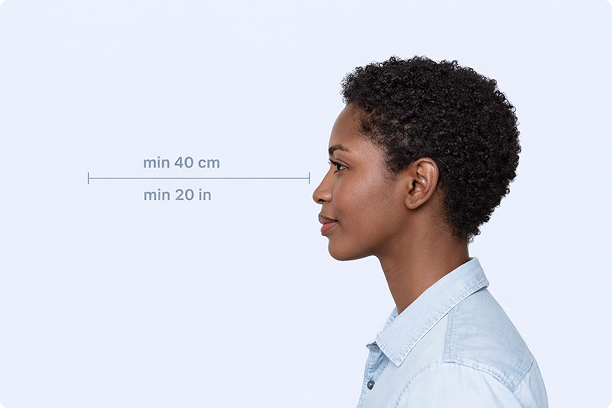
Correct Distance
Hold your camera at arm's length (40cm/20in minimum) for the best results
_1768770085753-BWkNoFUp.jpg)
Face The Camera
Look straight at the camera with a neutral expression and eyes open
Even Lighting
Use natural light or soft indoor lighting to avoid shadows on your face
What You Get
Digital Photo
High-resolution JPEG for online applications
Print-Ready PDF
4x6 inch PDF with multiple copies and cut guides
Acceptance Guarantee
Full refund if your photo is rejected
Why Choose PassportApp?
Ready in 30 Seconds
Fast AI processing delivers your photo instantly.
Money Back Guarantee
Full refund if your application is rejected due to the photo.
Compliance Verified
Each photo is checked against official requirements.