USA Driving Licence Photo (Online Alternative)
Understand US driving licence photo requirements: where the DMV takes the photo, where you can supply your own, International Driving Permit photos for AAA, and how to prepare for your appointment.
- DMV photographs you in 48 states
- IDP photos for AAA (2x2 format)
- Texas & Ohio mail exceptions
- Blue backdrop — avoid blue clothing
- $9.99 — no hidden costs
- 100% acceptance guarantee


Drag to compare before vs after
Photo Specifications
Will my photo be accepted?
Size
35x45 mm
Lighting
No shadows
Focus
Sharp & clear
Background
White or off-white
Head height
1–1⅜ in (25–35 mm)
Recency
Last 6 months
Online submission
Printable
How It Works
1. Upload Your Photo
Take a photo with your smartphone or webcam, or upload an existing image.
2. Image Processing
We remove the background, crop to exact specifications, and check against compliance.
3. Download & Print
Get your digital photo instantly, plus a print-ready PDF with cut guides.
If you are searching for US driver's licence photo requirements, the most useful thing this page can tell you first is this: in 48 of 50 states, the DMV takes your photo. You do not prepare a photo file, visit a photo booth, or upload anything. You go to the DMV office and they photograph you with their own equipment. That said, there are three legitimate situations where you do need to supply your own driving-related photo: an International Driving Permit for driving abroad, a Texas licence renewal by mail if you qualify, and an Ohio licence renewal for military personnel stationed out of state. This page covers all three, explains how DMV photos actually work, and gives you the preparation tips that make a difference on the day.
The DMV takes your photo: the fact most guides bury
In all 50 states, for standard driver's licence applications and renewals: the Department of Motor Vehicles photographs you in person at the office. You cannot bring your own photo, upload a digital file, or submit a passport-style photo. The photo is taken at the time of your visit using the DMV's own calibrated digital camera system.
The REAL ID Act (6 CFR 37.17(e)) explicitly requires "mandatory facial image capture" for every REAL ID-compliant card. This means even states that previously allowed applicants to submit their own photos had to change their process when REAL ID enforcement began. As of May 7, 2025, all 50 states are REAL ID compliant, which means all 50 states now mandate in-person photo capture at the DMV.
This is important to understand because many competing websites sell "US driver's licence photo" services that imply you can submit your own photo. For a standard application or renewal, you cannot. The exceptions are narrow and specific, covered in the next section.
Where you can supply your own driving-related photo
| Document | Issuing authority | Photo required | Who qualifies | |---|---|---|---| | International Driving Permit (IDP) | AAA (American Automobile Association) | 2x2 inch (51x51mm), white background, neutral expression, no glasses. Two identical prints required. | Most US licence holders planning international driving. | | Texas out-of-state licence renewal | Texas Department of Public Safety (mail form) | 2x2 inch passport-style photo submitted by mail with the renewal application. | Texas licence holders living out of state who meet specific eligibility criteria. | | Ohio out-of-state military renewal | Ohio Bureau of Motor Vehicles (mail form) | 2x2 inch passport-style photo. | Military service members and dependents stationed outside Ohio. |
PassportApp provides: a 2x2 inch (51x51mm) photo with white background that meets the AAA IDP requirement and both state mail-renewal formats. Download a digital file for any digital submission requirements, or the print-ready 4x6 template for photo prints.
International Driving Permit: the main driving photo you can prepare
An International Driving Permit is an official document recognized in more than 150 countries that allows US licence holders to drive abroad. It is not a standalone licence — it must be carried alongside your valid US driver's licence. In the United States, IDPs are issued exclusively by AAA (the American Automobile Association) and the American Automobile Touring Alliance (AATA).
Who needs an IDP:
You need an IDP if you plan to drive in a country that requires one. Most European countries, Japan, South Korea, Australia, New Zealand, and many others require or strongly recommend an IDP alongside your US licence. Some countries where you might assume your US licence works alone may require an IDP at a rental car counter or a police checkpoint. Check the requirements for each country you plan to drive in.
AAA photo requirements:
AAA requires two recent 2x2 inch (51x51mm) photos submitted with your IDP application. The requirements are identical to a US passport photo:
- Size: 2x2 inches (51x51mm). Square format.
- Background: Plain white or off-white. No shadows, textures, or patterns.
- Expression: Neutral expression. Both eyes open. Mouth closed.
- Head size: Head should fill approximately 50–69% of the frame, chin to crown.
- Glasses: Not recommended. Remove glasses for the photo.
- Recency: Taken within the last six months.
How to apply for an IDP:
Visit an AAA branch in person. IDPs can only be issued by AAA in person — you cannot apply online. Bring your valid US driver's licence, the completed IDP application form (available at AAA or download from aaa.com), and two 2x2 photos. The IDP fee is approximately $20. Processing is same-day at the AAA branch. IDPs are valid for one year from the date of issue.
[INFO]IDPs issued in the US by any organization other than AAA or AATA are not recognized internationally and are considered fraudulent. Websites selling "instant online IDPs" or "digital IDPs" are not issuing legitimate documents. Only paper IDPs issued in-person by AAA or AATA are valid.[/INFO]
State exceptions: Texas and Ohio
Texas out-of-state mail renewal:
The Texas Department of Public Safety allows eligible Texas licence holders who live out of state to renew their licence by mail rather than returning to Texas. The mail renewal process requires a 2x2 passport-style photo submitted with the renewal form. This is one of only two documented user-supplied photo workflows for US driver's licences as of 2026.
Eligibility for Texas mail renewal is specific: you must have a Texas driver's licence, be living outside Texas temporarily, meet residency requirements, and not have certain violations or conditions that require an in-person visit. Check the Texas DPS website (dps.texas.gov) for current eligibility criteria before taking a photo.
Ohio out-of-state military renewal:
The Ohio Bureau of Motor Vehicles allows active duty military service members and their dependents who are stationed outside Ohio to renew or obtain a duplicate Ohio licence by mail. The process requires a 2x2 passport-style photo submitted with the application. This is the second of only two documented user-supplied photo workflows for US driver's licences nationally.
Eligibility is limited to active duty military and their dependents who are stationed outside Ohio and hold or are eligible for an Ohio licence. Contact the Ohio BMV (bmv.ohio.gov) directly to confirm current requirements.
How DMV photos actually work: what the system enforces
Federal floor: REAL ID Act requirements
Every REAL ID-compliant driver's licence photo must meet the minimum standards set by 6 CFR 37.17(e) and the international biometric imaging standard ICAO Document 9303. These federal requirements apply in all 50 states and cover: full face must be visible chin to top of head; face must be centered in the frame; lighting must be evenly distributed on the face with no shadows in eye sockets; no eyewear that obstructs the iris or pupil; head coverings must not obscure any facial features.
The DMV background: blue, not white
Most people assume driver's licence photos use a white background like passport photos. They do not. All US state DMVs apply a blue or blue-grey background digitally during photo processing. The background is controlled entirely by the DMV system and applied after the photo is taken. You have no choice in background color. This is why wearing blue or grey clothing to a DMV appointment is a mistake: your clothing will blend into the backdrop.
Driver's licence vs passport: key differences
| Feature | Driver's licence | Passport | Key difference | |---|---|---|---| | Head fill (% of frame) | 70–80% | 50–69% | DL requires much larger head proportion | | Background color | Blue or blue-grey (DMV-applied) | White or off-white (applicant-controlled) | DL background is never white | | Photo taken by | DMV staff, calibrated equipment | You or a service you choose | DL: you have no control | | Submission | Captured at the office | Uploaded or provided to application | DL: in-person only (except TX and OH) | | Glasses | Prohibited in most states (AAMVA) | Prohibited since November 2016 | Both effectively ban glasses | | Expression | Neutral or natural closed-mouth (varies by state) | Neutral expression | DL more permissive on smiling in some states | | Recency | Always current by definition (DMV just took it) | 6 months (passport), 30 days (USCIS) | DL is always the most recent image |
State-by-state variation: smile and glasses policy
Federal REAL ID standards set the minimum requirements, but states have discretion on expression and glasses policy. The American Association of Motor Vehicle Administrators (AAMVA) issues best-practice guidelines that most states follow, but several states diverge on smiling and glasses.
| Expression | Policy | States | Notes | |---|---|---|---| | Neutral expression required | AAMVA recommendation | Most states | Neutral expression produces the most consistent facial recognition results. | | Natural closed-mouth smile permitted | Explicitly accepted | Several states including California, Florida, Texas | A relaxed, natural closed-mouth expression is explicitly accepted. No open-mouth smiles or visible teeth. | | Wide smile prohibited universally | All states | All states | A wide smile that lifts the cheeks and narrows the eyes is rejected by all state DMV systems. |
[TIP]State DMV smile and glasses policies update periodically. Always check your specific state DMV website before your appointment rather than relying on guides that may be outdated. Calling the DMV directly takes two minutes and eliminates uncertainty.[/TIP]
Glasses policy:
AAMVA best-practice guidelines and most states now prohibit glasses in driver's licence photos. The prohibition exists because glasses create glare, obstruct the eyes, and reduce the reliability of facial recognition systems. A small number of states still permit glasses under specific conditions (no glare, frames do not cover the eyes). Medical exceptions exist in all states but require documentation.
The practical advice: remove glasses before your DMV appointment. If you wear prescription glasses for medical reasons and believe you qualify for an exception, contact your DMV ahead of time to confirm what documentation is required.
How to prepare for your DMV appointment
Since you cannot control most aspects of the photo itself, the aspects you can control matter more.
1. Schedule at the right time:
DMV offices are typically busiest on Mondays, Fridays, and days immediately before and after public holidays. Midweek mornings are generally the quietest. A less busy appointment means the clerk has more time to take a good photo and more time to retake it if the first attempt has a technical issue. Some states now offer appointment scheduling online — use it.
2. Wear the right color:
Most state DMVs apply a blue or blue-grey background digitally. Wearing blue, grey, or any color close to the backdrop causes your clothing to blend into the background. Wear a color with strong contrast against blue: burgundy, dark green, navy (darker than the backdrop), black, or dark red. Avoid white and very pale colors, which have low contrast against pale blue-grey DMV backdrops.
3. Prepare your hair and face:
Keep hair away from your face. The DMV photo system needs to clearly see the full face from chin to hairline. Pin back any hair that falls across the forehead. Arrive with your face clean and without heavy makeup that significantly alters your appearance from everyday life.
4. Know your state's glasses policy in advance:
In most states you will be asked to remove glasses. Call your DMV or check the state website before arriving. If you have prescription glasses and think you qualify for an exception, bring the medical documentation.
5. Head position and expression:
Face the camera directly with your head level and centered. Even a slight tilt changes the geometric measurements the facial recognition system uses. If your state permits a natural expression, aim for a relaxed, neutral face. Take a breath in, exhale slowly, and let your face settle naturally just before the photo is taken.
Mobile driver's licences: no new photo required
More than 20 US states now offer mobile driver's licences (mDL) available through Apple Wallet, Google Wallet, or state-specific apps. TSA accepts mDLs at security checkpoints at participating airports. States where mDLs are available include Arizona, Colorado, Georgia, Maryland, California, and others, with more states launching annually.
One thing that surprises people: activating or using a mobile driver's licence does not require a new photo. The photo displayed on your mDL is exactly the same image captured at the DMV during your last in-person visit. The mDL simply stores the existing DMV image in a standardized digital format (ISO/IEC 18013-5). You do not take a selfie, upload a new photo, or do anything related to the photo to enable your mDL.
Practical implication: if you want your mDL photo to look good, the time to act is before your next DMV appointment, not when you are setting up your digital wallet. Your preparation at the DMV visit determines the photo quality for both your physical card and your mobile licence.
Other United States Document Photos
How to Prepare Yourself
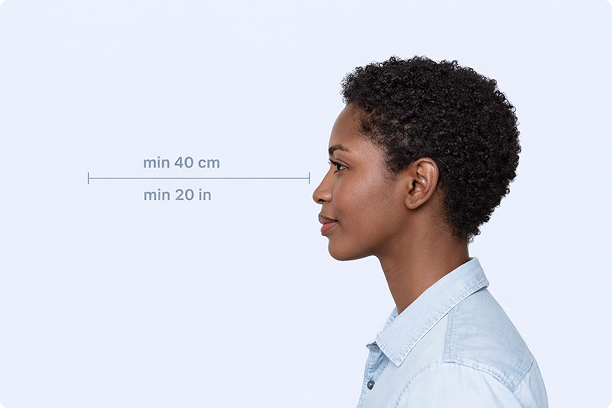
Correct Distance
Hold your camera at arm's length (40cm/20in minimum) for the best results
_1768770085753-BWkNoFUp.jpg)
Face The Camera
Look straight at the camera with a neutral expression and eyes open
Even Lighting
Use natural light or soft indoor lighting to avoid shadows on your face
What You Get
Digital Photo
High-resolution JPEG for online applications
Print-Ready PDF
4x6 inch PDF with multiple copies and cut guides
Acceptance Guarantee
Full refund if your photo is rejected
Why Choose PassportApp?
Ready in 30 Seconds
Fast AI processing delivers your photo instantly.
Money Back Guarantee
Full refund if your application is rejected due to the photo.
Compliance Verified
Each photo is checked against official requirements.