USA Passport Photo (Online Alternative)
Upload a photo taken at home. Verified against 2026 State Department requirements in minutes. No AI alteration of your face. White background applied. Print-ready 4x6 template included.
- 2x2 inch (51x51mm) format
- State Department compliant
- No AI face alteration
- Print-ready 4x6 template
- $9.99 — no hidden costs
- 100% acceptance guarantee


Drag to compare before vs after
Photo Specifications
Will my photo be accepted?
Size
2x2 in
Lighting
No shadows
Focus
Sharp & clear
Background
White or off-white
Head height
1–1⅜ in (25–35 mm)
Recency
Last 6 months
Online submission
Printable
How It Works
1. Upload Your Photo
Take a photo with your smartphone or webcam, or upload an existing image.
2. Image Processing
We remove the background, crop to exact specifications, and check against compliance.
3. Download & Print
Get your digital photo instantly, plus a print-ready PDF with cut guides.
Get your US passport photo verified against 2026 State Department requirements from home in minutes. No trips to CVS or Walgreens. No AI alteration of your face. Just your unaltered photo, cropped and background-corrected to exact specification. Includes a print-ready 4x6 template for printing at Walmart ($0.16), CVS ($0.38), or Walgreens ($0.39). 100% acceptance guarantee or your money back.
The 2026 AI editing rule: what is banned and what is not
The State Department's zero-tolerance enforcement for AI-altered photos came into full effect on January 1, 2026. Any photo showing signs of AI manipulation is now rejected outright during initial review with no appeals.
What the rule bans:
- Beauty filters and skin smoothing that alter your skin texture or tone.
- AI-generated or AI-replaced backgrounds that leave unnatural edges, color banding, or hair-edge artefacts.
- Face-editing features that change any facial feature, including eye brightening, wrinkle removal, or lip color adjustment.
- Portrait mode background blur, which the State Department's automated system flags as a non-plain background.
- Any app filter, preset, or enhancement that changes how you look.
What the rule does not ban:
- AI validation: using AI to check whether a photo is the correct size, head position, background color, and expression. This is compliance checking, not alteration.
- Background replacement that correctly applies a plain white or off-white color without unnatural edges. Background removal is explicitly accepted when done cleanly.
- Cropping and resizing to the required 2x2 inch or digital pixel dimensions.
How PassportApp handles this:
Our AI checks compliance (head size, position, background, expression) and applies background correction to the required white color. We do not alter your face, apply filters, or change your appearance. The photo you submit is your unaltered face against a compliant white background. This is validation, not alteration.
US passport photo specifications 2026
Source: US Department of State, travel.state.gov/en/passports/apply/help/photos.html, last updated March 24, 2026
| Requirement | 2026 State Department specification | |---|---| | Printed size | 2 x 2 inches (51 x 51 mm). Square format. | | Head height | 1 to 1-3/8 inches (25–35mm) chin to crown. 50–69% of photo height. | | Eye position | 1-1/8 to 1-3/8 inches (28–35mm) from bottom of photo. | | Background | Plain white or off-white. No shadows, textures, lines, or patterns. | | Expression | Neutral expression or natural closed-mouth expression. No open mouth, no teeth. | | Eyes | Both eyes open, looking directly at camera. | | Glasses | Not permitted. Medical exception requires signed doctor's letter. | | Head coverings | Not permitted unless worn daily for religious or medical reasons. Signed statement required. | | Recency | Taken within the last 6 months to reflect current appearance. | | Editing | No AI alteration. No filters. No digital changes to appearance. | | Camera distance | Several feet (approximately 1.2 m) from camera per State Dept guidance. | | Hair | Hair may extend past photo edges. Full head must be visible at correct size. | | Military uniform | Active duty military may wear uniform. No hat or helmet. | | Digital format | JPG, JPEG, PNG, HEIC, or HEIF. 600×600 to 1200×1200 pixels. Minimum 240KB. |
Three application routes, three different photo needs
The correct photo format depends on how you are applying. The State Department has different requirements for each route.
| Route | Photo requirement | Who qualifies | |---|---|---| | Online renewal (MyTravelGov) | One digital file. JPG, JPEG, PNG, HEIC, or HEIF. 600×600 to 1200×1200 pixels. No prints needed. | Eligible adults: passport issued when 16+, within last 15 years, undamaged, not lost/stolen, no name change. Routine service only. | | Mail-in (Form DS-82) | One 2x2 inch printed photo on photo-quality paper. Staple to form with four staples at corners. Do not bend. | Same eligibility as online. Child passports (under 16) cannot renew by mail. | | In-person (Form DS-11) | One 2x2 inch printed photo. Do NOT staple yourself. The acceptance agent does it. | First-time applicants, lost/stolen passports, under-16s, ineligible renewals. |
PassportApp provides both: a digital file formatted for the online renewal portal, and a print-ready 4x6 template with four 2x2 photos for mail-in and in-person applications. Download both formats from your account after purchase.
Also valid for: USCIS, green card, and DV Lottery
The same 2x2 inch, white background, State Department-compliant photo is also required for several other US government documents. PassportApp produces a photo valid for all of these from a single session.
| Document | Notes | |---|---| | US Passport book | Standard international travel document. 10-year validity adults, 5-year children. | | US Passport card | Land and sea travel to Canada, Mexico, Caribbean, Bermuda. Lower cost than book. | | USCIS Form I-485 | Adjustment of Status (green card). 30-day recency rule applies. | | USCIS Form N-400 | Naturalization (citizenship application). 30-day recency rule applies. | | USCIS Form I-765 | Employment Authorization Document. 30-day recency rule applies. | | Green card renewal (I-90) | Same photo specification. 30-day recency applies. | | DV Lottery (DS-5540) | Diversity Visa program. Same 2x2 specification. Annual October registration window. |
[INFO]USCIS recency rule: USCIS requires photos taken within 30 days of application submission, significantly stricter than the passport's 6-month rule. If you are applying for both a passport and a USCIS form, take the photo within 30 days of both submission dates.[/INFO]
The real cost of a rejected photo
The State Department states directly on travel.state.gov: "Unacceptable photos are the number one reason why we put passport applications on hold." A photo rejection does not mean starting over. But it does mean delay, and delay has a real cost.
| Scenario | Total fees | Timeline | |---|---|---| | Standard routine processing | $130 adult application fee | 4–6 weeks processing + 2 weeks mail each way | | Expedited (because of photo delay) | $130 + $60 expedite fee | 2–3 weeks + mail time | | Priority mail shipping | $130 + $60 + $23.36 | Passport delivered in 1–3 days after issue | | Emergency in-person agency | $130 + $60 + travel costs | Required if travel within 14 days |
A photo rejection that forces you into expedited service adds $83.36 in fees and potentially significant travel costs to a regional passport agency. Against that, paying $9.99 for a verified, guaranteed photo is straightforward expected-value calculation. The guarantee covers the rare case where even a verified photo is rejected by a human reviewer.
Printing your photos: the 4x6 template hack
Once you have downloaded your PassportApp photo, you do not need to pay $14.99–$16.99 for a full drugstore passport photo service. PassportApp includes a print-ready 4x6 template with four 2x2 photos pre-arranged on a single sheet with cut guides.
| Option | 2026 price | Notes | |---|---|---| | Walmart Photo | ~$0.16 per 4x6 print | Cheapest option. Same-hour pickup at most locations. | | CVS Photo (4x6 print) | ~$0.38 per 4x6 print | Same-day pickup. Upload online, collect in store. | | Walgreens Photo (4x6 print) | ~$0.39 per 4x6 print | Same-day pickup. | | Amazon Photos | ~$0.17 per 4x6 | Prime shipping, 1–3 days delivery. Not same-day. | | Home printer (photo paper) | ~$0.10–$0.25 per sheet | Instant. Use glossy or matte photo paper only, not regular paper. | | CVS full passport service | $16.99 | No AI compliance check. No retake guarantee. No digital file unless paid extra. | | Walgreens full passport service | $14.99 | Same limitations as CVS. |
[TIP]When uploading your 4x6 template to any print service, select "4x6 actual size" or "no zoom" and "do not crop to fill." If the service automatically crops or scales the image to fill the paper, the 2x2 photos will be the wrong size. Set the print to actual size before confirming.[/TIP]
What causes US passport photo rejections in 2026
| Rejection cause | Why it fails | Fix | |---|---|---| | Wrong background | Not plain white or off-white. Cream, grey, blue, or any color other than white is rejected. | PassportApp automatically applies the correct white background. | | Head too small or large | Head must be 50–69% of the 2x2 frame. | Position camera several feet (1.2m) from your face. Use a second person or timer. | | AI alteration detected | Beauty filters, skin smoothing, portrait mode blur, or any face editing. Zero tolerance since Jan 2026. | Turn off all phone processing before taking the photo. | | Glasses present | No glasses unless you have a signed doctor's statement confirming medical necessity. | Remove glasses before the photo. | | Shadow on face or background | Overhead lighting creates shadows under nose and chin. Standing too close to wall creates shadow behind head. | Face a window for natural frontal light. Stand several feet from the background. | | Photo more than 6 months old | Must reflect current appearance taken within the last 6 months. | Take a fresh photo for each application. | | File format for online renewal | HEIC files from iPhones may need conversion. File must be 240KB to 10MB. | Set iPhone to Settings > Camera > Formats > Most Compatible before taking photo. |
Babies and children
Child passport photos follow the same 2x2 inch specification with relaxed expression rules for infants. Every child needs their own passport. Children cannot appear on a parent's passport.
| Age | Rules | |---|---| | Infants | Eyes do not need to be fully open. Non-neutral expression acceptable. Lay the baby on a plain white sheet and photograph from above. No other person visible. | | Toddlers and children | Eyes must be open. Face must be visible. No one else in the photo. | | All ages | No hats, no head coverings unless religious or medical. No toys, no dummies, no car seats visible. |
[INFO]State Dept specifically states for babies: lay them on a plain white or off-white sheet, use a white blanket or sheet to cover a car seat if needed, and photograph from directly above. Eyes do not need to be entirely open for infants.[/INFO]
Taking the photo at home: State Department guidance
The State Department explicitly permits you to take your own photo at home. From travel.state.gov: "Position yourself several feet away from a white background or wall." This is approximately 1.2 metres (4 feet) from the background.
Background:
White or off-white wall. If your wall is not white, tape a white sheet or piece of foam board to it. The State Dept specifically says to "use a white blanket or sheet to cover a non-white wall."
Distance:
The camera should be several feet (approximately 1.2m) away. A second person taking the photo produces better results than a selfie, which typically puts the camera too close and distorts head proportions.
Lighting:
Face a window. Natural daylight produces even, shadow-free illumination. Turn off overhead ceiling lights if they create shadows under your nose and chin.
Expression:
Neutral expression with both eyes open, mouth closed. A slight natural closed-mouth expression is permitted. No open mouth, no visible teeth.
Camera settings:
Turn off portrait mode, beauty mode, skin smoothing, and HDR. Turn off flash. For iPhone users: Settings > Camera > Formats > Most Compatible (saves as JPEG in sRGB).
Hair:
Hair may extend past the edges of the photo frame. The State Dept explicitly confirms this. Your full head must be visible at the correct size, not compressed.
Other United States Document Photos
How to Prepare Yourself
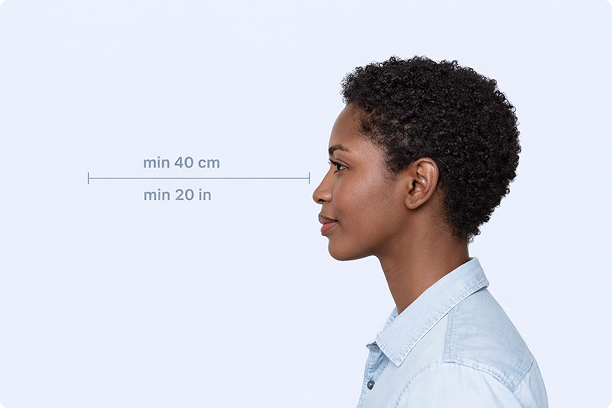
Correct Distance
Hold your camera at arm's length (40cm/20in minimum) for the best results
_1768770085753-BWkNoFUp.jpg)
Face The Camera
Look straight at the camera with a neutral expression and eyes open
Even Lighting
Use natural light or soft indoor lighting to avoid shadows on your face
What You Get
Digital Photo
High-resolution JPEG for online applications
Print-Ready PDF
4x6 inch PDF with multiple copies and cut guides
Acceptance Guarantee
Full refund if your photo is rejected
Why Choose PassportApp?
Ready in 30 Seconds
Fast AI processing delivers your photo instantly.
Money Back Guarantee
Full refund if your application is rejected due to the photo.
Compliance Verified
Each photo is checked against official requirements.