USA ID Card Photo (Online Alternative)
Understand US ID card photo requirements: what the DMV photographs in person, which documents accept a photo you provide, REAL ID enforcement since May 2025, and how to prepare for your appointment.
- DMV photographs you in person
- USCIS documents accept your photo
- REAL ID compliant guidance
- Texas & Ohio mail exceptions
- Driver's licence vs passport
- Appointment prep checklist


Drag to compare before vs after
Photo Specifications
Will my photo be accepted?
Size
35x45 mm
Lighting
No shadows
Focus
Sharp & clear
Background
White or off-white
Head height
1–1⅜ in (25–35 mm)
Recency
Last 6 months
Online submission
Printable
How It Works
1. Upload Your Photo
Take a photo with your smartphone or webcam, or upload an existing image.
2. Image Processing
We remove the background, crop to exact specifications, and check against compliance.
3. Download & Print
Get your digital photo instantly, plus a print-ready PDF with cut guides.
Most people searching for US ID card photo requirements are trying to solve one of three genuinely different problems: preparing for a DMV appointment, understanding what REAL ID enforcement means for them in 2026, or finding out whether they can submit their own photo for a specific document. The answers to these three questions are very different, and this page covers all of them.
The most important fact: the DMV photographs you
In all 50 states, for all standard driver's licence and state ID applications and renewals: the DMV photographs you in person at the office. You cannot bring your own photo, upload a selfie, or submit a passport photo. The photo is taken at the time of your appointment using the DMV's own calibrated equipment.
This is the answer most people searching "US ID card photo" actually need, and most guides bury or avoid. Understanding it saves a wasted trip to a photo booth and redirects your preparation effort toward what actually matters: the documents you bring, the clothing you wear, and the time you schedule your appointment.
There are two documented narrow exceptions in the United States. Texas allows eligible out-of-state applicants to submit a 2x2 passport-style photo by mail for licence renewal. Ohio allows military personnel and their dependents who are stationed outside Ohio to submit a 2x2 passport-style photo by mail. Both are mail-renewal workflows with specific eligibility criteria. All other standard applications and renewals, in all 50 states, require an in-person visit where the DMV takes the photo.
US government ID documents that do accept a photo you provide
Several US government identity documents require you to supply your own 2x2 inch photo rather than being photographed in person. For all of these, a PassportApp photo meets the specification exactly.
| Document | Form | Photo spec | |---|---|---| | USCIS Employment Authorization Card (I-766) | Form I-765 | 2x2 inch, white background. USCIS 30-day recency rule. | | US Permanent Resident Card / Green Card (I-551) | Form I-485 or I-90 | 2x2 inch, white background. USCIS 30-day recency rule. | | Naturalization Certificate | Form N-400 | 2x2 inch, white background. USCIS 30-day recency rule. | | US Passport book and card | DS-11 / DS-82 / online renewal | 2x2 inch, white background. 50–69% head fill. 6-month recency. | | US Merchant Mariner Credential | NMC application | 2x2 inch, white background. Submitted with application. | | Texas DL mail renewal (out-of-state eligible) | Texas DPS mail form | 2x2 passport-style photo. Specific eligibility criteria apply. | | Ohio BMV military out-of-state renewal | Ohio BMV form | 2x2 passport-style photo. Military service members and dependents only. |
[INFO]Note on USCIS recency: USCIS requires photos taken within 30 days of application submission, significantly stricter than the passport 6-month rule. If you are applying for both a passport and a USCIS document, take the photo within 30 days of both submissions.[/INFO]
REAL ID in 2026: what changed and what it means for you
REAL ID enforcement began on May 7, 2025. Since that date, a state-issued driver's licence or ID card must be REAL ID compliant to be used for boarding domestic flights or entering secured federal facilities including military installations. All 50 states, the District of Columbia, and all US territories are now fully REAL ID compliant.
How to check if your current licence is REAL ID compliant:
Look at the upper right-hand corner of your licence. A REAL ID compliant card has a star symbol. If your card has this star, you are already compliant and nothing further is required. If your card does not have the star, you need to visit your DMV in person to upgrade.
What the REAL ID upgrade requires:
Upgrading to a REAL ID requires an in-person DMV visit with documentation. Federal law requires the DMV to verify three categories of document:
- Proof of identity: US passport, birth certificate, or other federal identity document.
- Proof of Social Security number: Social Security card, W-2, or pay stub showing the full SSN.
- Two proofs of US address: Utility bill, bank statement, or lease showing your name and current address.
The photo is retaken during the upgrade visit. You cannot use your existing licence photo. The DMV's camera captures the image, and automated software reviews it in real time before you leave the camera station. If there is a compliance issue (blink, shadow, incorrect expression), the clerk will photograph you again immediately.
[INFO]TSA ConfirmID since February 2026: Since February 1, 2026, travelers who do not have an acceptable form of ID can pay a $45 fee at the TSA checkpoint to use the ConfirmID program. TSA will attempt to verify identity through alternative means. ConfirmID is a last resort, not an alternative to obtaining a REAL ID compliant document.[/INFO]
If you are traveling domestically and your licence does not have the REAL ID star, you will need to use a passport or passport card at TSA checkpoints, or pay the $45 ConfirmID fee. REAL ID compliant IDs cannot be used for international travel. A passport is still required for that.
How driver's licence photos differ from passport photos
This is one of the most useful and least-covered pieces of information for anyone who has recently taken a passport photo and assumes the same photo would work for a driver's licence. It would not.
| Feature | Driver's licence | Passport | Key difference | |---|---|---|---| | Head size (% of frame) | 70–80% of frame height | 50–69% of frame height | DL requires a much larger head fill | | Background color | Blue or grey (state-controlled) | White or off-white | DL uses colored backdrops in most states | | Photo taken by | DMV staff, calibrated equipment | You, or a service you choose | DL: no choice. Passport: your control | | Glasses | Most states prohibit (AAMVA guidance) | Prohibited since Nov 2016 | Both effectively ban glasses | | Smile | Varies by state. Many allow closed-mouth smile | Neutral expression | DL more permissive on expression in some states | | Head covering | Prohibited unless religious/medical. Documentation required. | Prohibited unless religious/medical. Signed statement required. | Same standard, different documentation process | | Recency | Retaken at DMV, always current | 6 months for passport; 30 days for USCIS | DL is always current by definition |
The head fill difference is the most practically important. A compliant US passport photo with a head at 55–65% of the frame would look noticeably different from a typical driver's licence photo, where the head fills nearly the entire upper portion of the frame. This is by design: driver's licences are primarily identity documents used at close range by officers comparing the photo to the person. Passport photos serve a different biometric function.
State variation: smile and glasses policies
The federal REAL ID Act sets minimum standards for the information a licence must contain, but it does not dictate expression or glasses policy. The American Association of Motor Vehicle Administrators (AAMVA) issues best-practice guidelines that most states follow, but states have discretion on several photo parameters.
Expression policy by state:
AAMVA best-practice guidelines recommend a neutral expression for facial recognition system reliability. However, a number of states explicitly permit a natural closed-mouth smile. The states most commonly cited as permitting a natural smile include California, Texas, and Florida, though state policies update periodically. Check your specific state DMV website before your appointment rather than relying on guides that may be outdated.
The underlying reason expression policy matters: state DMVs use facial recognition software to check for duplicate licences and verify identity over time. A wide smile that lifts the cheeks, narrows the eyes, and significantly changes facial geometry is more likely to cause problems with these systems than a subtle, natural closed-mouth expression.
Glasses policy by state:
AAMVA guidelines and most states now prohibit glasses in driver's licence photos, aligning with the post-2016 federal passport photo standard. The prohibition is driven by the same facial recognition accuracy concerns. However, a small number of states still permit glasses if certain conditions are met (no glare, eyes fully visible). Check your state DMV website for the current rule.
The safest approach in any state: remove glasses for the photo. If you wear prescription glasses and prefer to wear them, call your DMV ahead of time to confirm the current policy for your state.
How to prepare for your DMV photo appointment
Since you cannot control most aspects of how the DMV takes your photo, the aspects you can control matter more. Preparation that takes five minutes can make a significant difference in the result.
What to wear:
Most DMVs use a blue or grey backdrop for driver's licence photos. Avoid wearing blue, grey, or any color close to the backdrop — your clothing will blend into the background, which produces a poor photo and in extreme cases can affect facial recognition performance. Dark navy, burgundy, dark green, and black all work well. Avoid white, which has lower contrast against pale DMV backdrops. Do not wear a uniform if you have one — AAMVA guidelines and most state DMVs advise against uniform clothing in driver's licence photos.
When to schedule:
DMV offices are typically busiest on Mondays, Fridays, and the days immediately before and after public holidays. Midweek mornings are generally the quietest. Scheduling your appointment at a less busy time reduces the chance of a rushed photo session and increases the likelihood the clerk has time to retake the photo if the first attempt has a technical issue.
Expression:
Most states require a neutral expression or permit only a closed-mouth natural expression. Do not smile broadly. Look directly at the camera. Open your eyes fully. Relax your jaw before the photo is taken rather than holding a deliberate expression, which often looks tense.
Hair and head position:
Keep hair away from your face. The DMV photo system needs to clearly see the full face from chin to hairline. Face the camera directly. Even a slight head tilt changes the geometric measurements the biometric system uses.
Glasses and head coverings:
In most states you will be asked to remove glasses. Be prepared for this. If you wear a head covering for religious reasons, contact your DMV ahead of the appointment to confirm what signed statement or documentation they require — requirements vary by state.
Military ID and federal PIV cards
Military Common Access Cards (CAC):
Common Access Cards for active duty, reserve, and National Guard personnel, as well as DoD civilian employees and eligible contractors, are issued through Defense Enrollment Eligibility Reporting System (DEERS) enrollment. The photo is captured at a RAPIDS site (Real-time Automated Personnel Identification System). You cannot submit your own photo.
Federal Personal Identity Verification (PIV) cards:
PIV cards are issued to federal employees and contractors who require logical and physical access to federal systems and facilities. They are issued under FIPS 201-3 standards. The enrollment process, including photo capture, happens at a government enrollment center. You cannot submit your own photo.
Military ID for veterans and dependents:
Veterans Identification Cards (VIC) and dependent ID cards are issued through the Veterans Benefits Administration and Defense Finance and Accounting Service respectively. The photo is captured during the issuance process. Same conclusion: you cannot submit your own photo.
Can I update my driver's licence photo without waiting for expiry?
Most states only update the photo when the licence is renewed or replaced. A few states offer a photo-only update at certain intervals. The most common scenarios where a photo update is possible without a full renewal:
- Name change: Changing your name on the licence typically requires a new photo to be taken at the DMV, even if the licence has not expired.
- Significant appearance change: Some states allow you to request a new photo if your appearance has changed significantly from the photo on file, though this is discretionary.
- Lost or stolen licence: Replacing a lost or stolen licence typically produces a new photo at the DMV.
- Duplicate licence: Requesting a duplicate in some states allows for a photo update at the same time.
Contact your state DMV directly to confirm the current policy. Photo-only updates outside of renewal are not universally available and the specific conditions vary significantly by state.
Other United States Document Photos
How to Prepare Yourself
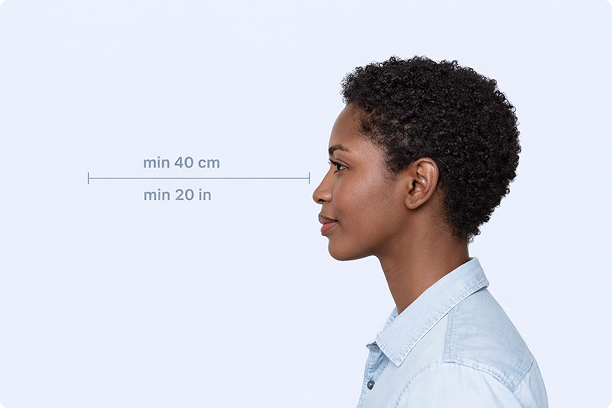
Correct Distance
Hold your camera at arm's length (40cm/20in minimum) for the best results
_1768770085753-BWkNoFUp.jpg)
Face The Camera
Look straight at the camera with a neutral expression and eyes open
Even Lighting
Use natural light or soft indoor lighting to avoid shadows on your face
What You Get
Digital Photo
High-resolution JPEG for online applications
Print-Ready PDF
4x6 inch PDF with multiple copies and cut guides
Acceptance Guarantee
Full refund if your photo is rejected
Why Choose PassportApp?
Ready in 30 Seconds
Fast AI processing delivers your photo instantly.
Money Back Guarantee
Full refund if your application is rejected due to the photo.
Compliance Verified
Each photo is checked against official requirements.