Green Card & Residence Permit Photo (US)
USCIS requires a 2x2 inch photo taken within 30 days of filing — stricter than a passport. Covers green card (I-485), EAD (I-765), naturalization (N-400), and every other USCIS form that requires a photo.
- 2x2 inch (51x51mm) — not 35x45mm
- 30-day recency rule explained
- December 2025 ASC policy covered
- May 2026 I-485 policy shift covered
- Print-ready 4x6 template included
- 100% acceptance guarantee


Drag to compare before vs after
Photo Specifications
Will my photo be accepted?
Size
35x45 mm
Lighting
No shadows
Focus
Sharp & clear
Background
White or off-white
Head height
1–1⅜ in (25–35 mm)
Recency
Last 6 months
Online submission
Printable
How It Works
1. Upload Your Photo
Take a photo with your smartphone or webcam, or upload an existing image.
2. Image Processing
We remove the background, crop to exact specifications, and check against compliance.
3. Download & Print
Get your digital photo instantly, plus a print-ready PDF with cut guides.
USCIS immigration applications require a 2x2 inch passport-style photo taken within 30 days of filing. This is the same physical format as a US passport photo but with a stricter recency rule: 30 days instead of 6 months. Every form in the USCIS system that requires a photo uses this same specification. This page covers the current photo requirements, the December 2025 ASC biometrics policy change, the May 2026 I-485 policy shift, and the practical details most guides miss — including what to write on the back of the photos and why submitting 35x45mm photos is one of the most common errors.
USCIS photo specifications 2026
| Requirement | USCIS specification | |---|---| | Size | 2 x 2 inches (51 x 51 mm). Square format. NOT 35x45mm — that is the UK/international format. | | Head height | 1 to 1-3/8 inches (25–35mm) from chin to crown. Same as US passport. | | Background | White to off-white. Plain, no shadows, textures, or patterns. | | Finish | Printed on thin paper with a glossy finish. Unmounted. | | Retouching | Not permitted. Unretouched. No AI alteration, no filters, no skin smoothing. | | Expression | Full face, frontal view. Neutral expression. Both eyes open. | | Color | Color photographs only. No black and white. | | Recency | Taken within 30 days of the filing date. Stricter than passport (6 months). | | Quantity | Two identical photos for most forms filed by mail. Check specific form instructions. | | Back of photo | Write your A-Number (if any) and form receipt number lightly in pencil on the back. |
[WARNING]The most common sizing error: submitting 35x45mm (1.38 x 1.77 inch) photos intended for a UK or international passport. USCIS requires 2x2 inches (51x51mm). These are different formats — 35x45mm is visibly smaller and rectangular. PassportApp produces the correct 2x2 inch format for all USCIS applications.[/WARNING]
Sources: USCIS Policy Manual Volume 7 Part A Chapter 4 (I-485 applications); USCIS N-400 Instructions; USCIS I-751 Instructions; USCIS December 12, 2025 photograph reuse policy guidance.
December 2025: the ASC photo policy change
On December 12, 2025, USCIS issued new guidance changing its photograph policy for identity documents. Two significant changes took effect immediately:
Self-submitted photos no longer accepted for document production:
For certain forms, USCIS will no longer use a self-submitted photo to produce the secure document. Instead, the photo embedded in your Permanent Resident Card, Employment Authorization Document, or other USCIS-issued document will be the photo captured at your Application Support Center (ASC) biometrics appointment. The forms specifically listed where a new ASC photo is required regardless of any previous photo: Form I-90 (Permanent Resident Card renewal), Form N-400 (Naturalization), Form N-600 (Certificate of Citizenship), and Form I-485 (Adjustment of Status/Green Card) filed with biometrics.
Three-year photo reuse limit:
Effective December 12, 2025, USCIS limits photo reuse to photographs taken within three years of the date a person files a USCIS form. This replaced the post-COVID policy that had allowed photo reuse for up to 10 years. A photo more than three years old cannot be reused on any new USCIS filing.
[INFO]What this means in practice: You still need to submit two printed 2x2 photos with your paper application package. The ASC photo is taken separately during your biometrics appointment and is used to produce the physical document. Both requirements apply independently — photos with the application and photo at the ASC.[/INFO]
May 2026: the I-485 adjustment of status policy shift
On May 21, 2026, USCIS issued Policy Memorandum PM-602-0199, directing officers to treat adjustment of status under INA Section 245 as extraordinary discretionary relief rather than a routine entitlement. The memo directs officers to encourage consular processing abroad for most temporary visa holders applying for a green card from within the United States.
USCIS subsequently clarified on May 29, 2026 that the memo does not establish a new policy and that adjustment of status remains available for many eligible applicants. However, I-485 applicants should expect increased scrutiny and potential requests for evidence about why adjustment rather than consular processing is warranted in their case.
Photo requirements for I-485 are unchanged by the May 2026 memo.:
Two 2x2 photos taken within 30 days of filing are still required with the application package. The policy change affects adjudication standards, not photo specifications.
For applicants now being directed toward consular processing (DS-260), the photo requirement shifts to two identical printed 2x2 photos brought to the consular interview — the same format PassportApp provides.
[WARNING]The decision about whether to file I-485 or pursue consular processing depends on your specific circumstances. Consult a licensed immigration attorney before making that decision. This page covers photo requirements only.[/WARNING]
Every USCIS form that requires a photo at filing
| Form | Purpose | Photo requirement | |---|---|---| | Form I-485 | Application to Register Permanent Residence (Green Card) | Two 2x2 photos. Within 30 days of filing. | | Form I-90 | Application to Replace Permanent Resident Card | Two 2x2 photos. ASC photo used for card production. | | Form I-751 | Petition to Remove Conditions on Residence | Two 2x2 photos per petitioner and each dependent. | | Form I-765 | Application for Employment Authorization (EAD) | Two 2x2 photos. Within 30 days of filing. | | Form I-131 | Application for Travel Document (Advance Parole) | Two 2x2 photos. | | Form I-821 | Application for Temporary Protected Status | Two 2x2 photos. | | Form N-400 | Application for Naturalization | Two 2x2 photos. ASC photo used for certificate. | | Form N-600 | Application for Certificate of Citizenship | Two 2x2 photos. ASC photo used for certificate. | | Form I-539 | Application to Extend/Change Nonimmigrant Status | Check current form instructions. Not always required. |
[TIP]Always check the current form instructions. USCIS updates photo requirements periodically. Before filing, download the latest form instructions from uscis.gov and verify the current requirement for your specific form.[/TIP]
The 30-day recency rule: why it catches people out
The USCIS 30-day recency rule is confirmed in the USCIS Policy Manual Volume 7 Part A Chapter 4, which states for I-485: "The photographs must have been taken within 30 days of filing." The same rule appears in the N-400 and I-751 instructions with identical language.
This is significantly stricter than the US passport 6-month rule. The practical consequences:
- Cannot reuse a passport photo: Even a photo taken for a passport application the previous month may be outside the 30-day window by the time you file the USCIS form.
- Cannot use a visa interview photo: A photo taken at a consular interview two months ago does not meet the 30-day requirement for a subsequent USCIS filing.
- Family applications filed together: Take all photos within the same session close to the filing date. Each person needs their own two photos.
- Filing delays: If your filing date slips, retake the photos. A photo taken when you planned to file that is now more than 30 days old is not compliant.
Practical approach:
Take the photo within a week of your intended filing date — after you have assembled all other documents and are ready to mail or submit the package.
Writing on the back of photos: the detail most guides miss
The USCIS paper photograph requirements specify that when submitting photos with an application, you should lightly print your Alien Registration Number (A-Number, if you have one) and your receipt number on the back of each photo in pencil.
For paper applications filed by mail, write your A-Number (if you have one), name, and the form number on the back of each photo in soft pencil before including them with the application package. This allows USCIS to match photos to applications if they become separated during processing.
[WARNING]Never use pen, marker, or ballpoint to write on the back of a passport photo. The pressure and ink will permanently damage the image on the front. Always use a soft pencil, write gently, and verify the writing has not pressed through before placing the photo in the envelope.[/WARNING]
Taking your own photo for USCIS
USCIS accepts photos taken at home provided they meet all specifications. The same setup advice as for US passport photos applies, with one key adjustment: since the 30-day window is strict, take the photo on the day you plan to assemble your application package rather than in advance.
- Background: Plain white or off-white wall. Use a white sheet or foam board if your wall is not white.
- Lighting: Face a window for natural frontal light. Avoid overhead ceiling lighting which creates shadows under the nose and chin.
- Camera distance: Position the camera several feet (approximately 1.2m) away from the subject. Use a second person or a tripod — not a selfie, which distorts head proportions.
- Camera settings: Turn off portrait mode, beauty mode, skin smoothing, and HDR. Turn off flash. iPhone users: Settings → Camera → Formats → Most Compatible (saves as JPEG in sRGB).
- Expression: Neutral expression. Both eyes open, facing directly at the camera. Mouth closed.
- Print on glossy photo paper: USCIS specifically requires "thin paper with a glossy finish." Regular printer paper is not acceptable.
Cheapest print option:
Download the PassportApp 4x6 template (four 2x2 photos on one sheet), upload to Walmart Photo, and order a standard 4x6 print for approximately $0.16. One sheet gives you four prints — enough for one complete filing with two spare photos.
Why USCIS photos are rejected
| Issue | Why it fails | Fix | |---|---|---| | Wrong size | Photo submitted as 35x45mm (UK/international format) instead of 2x2 inches. Visibly smaller and rectangular. | Use 2x2 inch format. PassportApp produces the correct size. | | Photo too old | More than 30 days from when the photo was taken to the filing date. | Take the photo within a week of filing. Retake if filing slips. | | Non-glossy paper | Printed on regular laser or inkjet paper rather than glossy photo paper. | Print at a photo service or on glossy photo paper at home. | | AI alteration | Skin smoothing, beauty filters, face editing. Zero-tolerance position, same as State Department. | Turn off all phone processing before taking the photo. | | Shadow on face or background | Overhead lighting creates facial shadows. Standing too close to wall creates background shadow. | Face a window. Stand several feet from the background. | | Wrong background | Any color other than white or off-white — blue, grey, cream that is too dark. | Plain white or off-white only. No textures. | | Mounted photo | Photo stapled to cardboard backing or otherwise mounted. | Unmounted. Loose print only. | | Pencil writing too heavy | Writing on the back has damaged the front of the photo. | Write very lightly with a soft pencil. |
Other United States Document Photos
How to Prepare Yourself
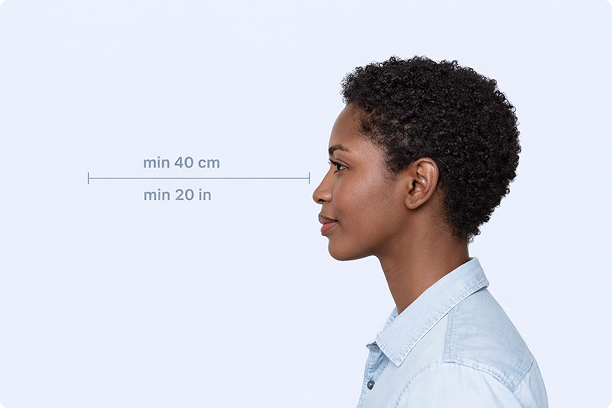
Correct Distance
Hold your camera at arm's length (40cm/20in minimum) for the best results
_1768770085753-BWkNoFUp.jpg)
Face The Camera
Look straight at the camera with a neutral expression and eyes open
Even Lighting
Use natural light or soft indoor lighting to avoid shadows on your face
What You Get
Digital Photo
High-resolution JPEG for online applications
Print-Ready PDF
4x6 inch PDF with multiple copies and cut guides
Acceptance Guarantee
Full refund if your photo is rejected
Why Choose PassportApp?
Ready in 30 Seconds
Fast AI processing delivers your photo instantly.
Money Back Guarantee
Full refund if your application is rejected due to the photo.
Compliance Verified
Each photo is checked against official requirements.