UK Passport Photo (Online Alternative)
Upload your photo, get verified against all HMPO specifications in minutes, and submit with confidence. If it fails, you get specific feedback — not just a rejection.
- 99.8% approval rate
- Verification in under 2 minutes
- Specific feedback if it fails
- Unlimited free retakes
- £9.99 — no hidden costs
- 100% acceptance guarantee


Drag to compare before vs after
Photo Specifications
Will my photo be accepted?
Size
900x1200 px
Lighting
No shadows
Focus
Sharp & clear
Background
Light grey or cream
Head height
29–34 mm
Recency
Last month
Online submission
Printable
How It Works
1. Upload Your Photo
Take a photo with your smartphone or webcam, or upload an existing image.
2. Image Processing
We remove the background, crop to exact specifications, and check against compliance.
3. Download & Print
Get your digital photo instantly, plus a print-ready PDF with cut guides.
Roughly one in five UK passport photos get rejected on first submission. Not because people are careless — because HMPO's automated checker has zero tolerance for anything outside the strict specifications. One rejection means your application gets delayed by one to two weeks. PassportApp verifies your photo against all HMPO requirements before you submit, so you know it will pass.
How It Works
Upload your photo in any format — phone photo, DSLR, studio shot, anything. Our system analyzes it against all HMPO requirements: size (35×45mm or 600×750px), aspect ratio (3:4), head positioning (29–34mm chin to crown), background colour and uniformity, facial expression, eye visibility, image quality, and file format. Verification completes within two minutes. If your photo passes, download immediately. If it needs adjustment, you get specific feedback — not just 'rejected', but 'head size needs to be larger' or 'background needs to be whiter'. Resubmit as many times as needed with no additional cost.
PassportApp vs. Alternatives
Photo booths (Tesco, Asda, supermarkets) cost £7–17 per visit. You don't see your photo before it prints. If it fails HMPO, you've wasted money and have to try again. Approval rate: 85–90%. Professional studios cost £15–40 and require appointments. Even professional photos sometimes get rejected. DIY without verification has a 28–38% rejection rate. PassportApp costs £9.99 once, gives you full control, specific feedback, and has a 99.8% approval rate.
The Real Cost of Rejection
A rejected HMPO photo means: waiting for rejection notification (3–5 days for online applications, up to 3 weeks for postal), retaking your photo and resubmitting, then waiting for re-review. Total delay: one to two weeks minimum. PassportApp verification at £9.99 eliminates this risk. You pay for the certainty of knowing your photo passes before you submit.
What Are the Rules for Passport Photos in the UK?
HMPO sets the rules, and they don't leave much room for interpretation. Your photo needs to hit specific measurements, show your face in a specific way, and be taken within the last month. Most rejections come down to a handful of the same mistakes.
Background.:
Light grey or cream is what HMPO asks for. White is technically accepted but causes more problems with the automated checker — the contrast between a pale face and a bright white wall can be low enough to confuse the system. Grey or cream is safer.
Head size.:
This is where most phone photos fail. Your head needs to fill roughly 70–80% of the frame height. If you take a selfie at arm's length, it almost certainly won't — you need to prop the phone up and step back.
The glasses ban.:
Since November 2022, glasses aren't allowed unless you have a doctor's letter explaining you can't remove them. A lot of people who haven't renewed recently don't know this.
One month limit.:
The UK's recency rule is much stricter than most countries — the US allows six months, most of Europe does too. Don't use a photo from a previous application or taken more than a few weeks ago.
Applying for a visa instead?:
Visa photos follow different rules to passport photos — a lighter background is allowed and, crucially, it must not be the same photo used on your passport. See the full <a href="/uk/visa-photo-requirements">UK visa photo requirements</a>.
Can You Take a UK Passport Photo on Your Phone?
Yes. HMPO allows photos taken on a phone or camera, and plenty of applications go through using them. GOV.UK does say booth and shop photos are more likely to pass — but that's because most phone photos have easily-fixable technical problems, not because the camera itself is the issue.
Get the setup right and a phone photo works fine.
Standing position.:
Put your phone on a surface — a shelf, leant against a mug, whatever — and step back until your head and upper shoulders fill the frame. Your head should take up most of the height of the shot. If you're taking it at arm's length, you're almost certainly too close and your head will be too small.
Background.:
Find a plain light-coloured wall with nothing on it. Stand at least half a metre away from it — ideally closer to a metre — so there's no shadow behind you. A magnolia or light grey painted wall works well. Avoid anything patterned or textured.
Lighting.:
Natural light from a window in front of you is the best option. It lights your face evenly and doesn't create shadows. Overhead lighting — a ceiling bulb — tends to cast shadows under your nose and chin, which the checker picks up. Don't use the flash.
Expression.:
This is where people slip up. Don't smile. Don't frown. Look at the camera and think of nothing in particular — a relaxed, blank expression. A small smile looks natural in real life but shifts enough facial geometry to get flagged.
Check the file.:
Before you use the photo: make sure it's a JPEG, hasn't been filtered or edited, and is at least 600 × 750 pixels. Don't crop it yourself — a verification service will do that to the right dimensions.
What Size Photo Is Required for a UK Passport?
It depends on whether you're applying online or on paper.
Paper applications.:
You need two identical printed photos, each 35mm wide by 45mm tall. They must be printed on proper photo paper — a standard home printer usually isn't sharp enough to pass HMPO's biometric requirements. The image of your face from chin to crown must measure between 29mm and 34mm. Both prints have to come from the same original file. You can't cut them out of a larger print, and they can't have borders.
Online applications.:
You don't send printed photos for an online passport application. Instead, you enter a digital photo code — called an IDPC — which you get from a verified photo provider. The code links your photo directly to your application on GOV.UK. No printing needed. If you upload your own photo rather than using a code, the file must be JPEG format, at least 600 pixels wide by 750 pixels tall, between 50KB and 10MB, colour, unedited, no filters.
Why the head size matters.:
The 29–34mm head height isn't just a framing rule — it's what HMPO uses to take the biometric measurements from your photo. The facial recognition system measures the distances between your eyes, nose and mouth, and if your head is too small in the frame those measurements become unreliable. It's why photo booths tend to get it right first time: they're set up to position your face at exactly the right distance.
Can I Take My Own Passport Photo at Home?
Yes — and plenty of people do. HMPO doesn't require a professional photographer or a photo booth. The rules apply equally to a photo taken at home on your phone as to one taken in Boots or Timpson.
The GOV.UK guidance does say photos from a booth or shop are more likely to be approved. The honest reason for that is that most home photos fail on avoidable technical grounds, not because they were taken at home.
What goes wrong most often:
- Head too small. By far the most common issue. Arm's-length selfies don't produce a large enough head in the frame. Stand back from the camera.
- Shadow behind you. Caused by standing too close to the wall. Move further from the background.
- Wrong background. Textured paint, wallpaper, coloured walls. You need a plain light-grey or cream surface.
- Flash. Creates harsh shadows and can blow out the skin tone around the face. Use natural light.
- Photo edited or filtered. Any processing — including background removal apps or beauty filters — makes the photo non-compliant.
- Slight smile. Looks fine to you, gets flagged by the automated checker. Go fully neutral.
The simplest way to be sure.:
Take your photo at home, then run it through a verification service before submitting. The service checks your photo against all current HMPO requirements — head size, background, lighting, expression — and either confirms it's fine or tells you what's wrong. That way you find out before the passport office does.
What Colours Are You Not Allowed to Wear for a Passport Photo?
HMPO doesn't publish a list of banned clothing colours. There's no rule that says you can't wear red, or black, or anything else in particular. The rules are about what's on your face, not what's on your body.
That said, a couple of practical things are worth knowing.
White and very pale tops.:
Not banned, but a bad idea. The required background is light grey or cream. If you're wearing white or a very light top against a light background, your shoulders can blend into it — and the checker can struggle to identify where you end and the background begins. A mid-tone or darker top gives much cleaner contrast. Navy, grey, or most solid colours work well.
Camouflage.:
HMPO's guidance specifically says not to wear camouflage-patterned clothing. The issue is the busy, complex print — it creates visual noise in the image.
Uniforms.:
Don't wear a uniform unless you wear it every day for religious reasons. Your passport photo should show how you normally look, so it remains a reliable form of identification throughout the passport's ten-year life.
Everything else.:
Pretty much anything goes. A plain collared top is the safest and most reliable option — it photographs cleanly, gives good contrast, and the crop doesn't leave you looking like you're wearing nothing once the image is trimmed to passport dimensions. Strappy or sleeveless tops can do that once cropped — worth bearing in mind.
What Are the New Rules for Passport Photos?
The main specifications — 35×45mm, neutral expression, light background — haven't changed in years. But there have been a few meaningful updates, and the automated checking has got stricter, which means photos that might have slipped through before are being caught now.
No glasses — since November 2022.:
The biggest change in recent years. Glasses are no longer allowed in UK passport photos. Not clear frames, not light prescription lenses — none of them, unless you have written medical evidence that you cannot remove them. Before 2022, glasses were allowed as long as your eyes were fully visible and there was no glare. That exception is gone. A lot of people who last renewed their passport five or six years ago don't know this. If your old passport photo had glasses in it, your new photo can't.
One-month recency — reaffirmed in HMPO Photo Standards v47, September 2025.:
The requirement to take your photo within the last month isn't new, but the September 2025 update to HMPO's photo standards made clear it's being enforced more strictly through automated checking. Photos taken more than about four weeks before submission are being rejected. The US allows six months, most EU countries do too — the UK's rule is genuinely much stricter. The practical implication: take your photo a few days before you apply, not weeks in advance.
Stricter automated checking.:
The GOV.UK online passport application runs photos through an automated checker before you can submit. Over the past couple of years that checker has been tightened — it now flags things that would previously have passed a manual review at a post office counter. Small shadows, a head that's marginally below the minimum size, a very slight head tilt. Photos that worked a few years ago may not now.
Digital photo codes (IDPC) — standard for online applications.:
When you apply online through GOV.UK you're asked to enter a photo code, not upload a file. This code — an IDPC — comes from a verified photo provider and confirms your image has been checked against HMPO's requirements. Taking a selfie directly in the GOV.UK application is still possible, but using a verified code from a service that checks compliance first is considerably more reliable.
How to Prepare Yourself
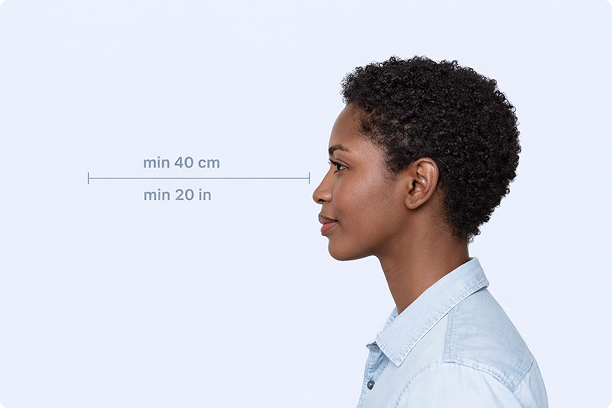
Correct Distance
Hold your camera at arm's length (40cm/20in minimum) for the best results
_1768770085753-BWkNoFUp.jpg)
Face The Camera
Look straight at the camera with a neutral expression and eyes open
Even Lighting
Use natural light or soft indoor lighting to avoid shadows on your face
What You Get
Digital Photo
High-resolution JPEG for online applications
Print-Ready PDF
4x6 inch PDF with multiple copies and cut guides
Acceptance Guarantee
Full refund if your photo is rejected
Why Choose PassportApp?
Ready in 30 Seconds
Fast AI processing delivers your photo instantly.
Money Back Guarantee
Full refund if your application is rejected due to the photo.
Compliance Verified
Each photo is checked against official requirements.