
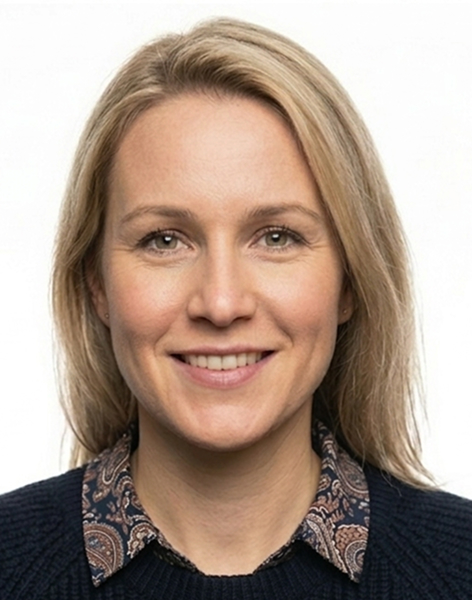
Official UK Passport Photo Size Requirements (2026)
The official UK passport photo size is 45 × 35 mm, with a face height requirement of 29–34 mm. This standard is set by His Majesty's Passport Office (HMPO) and applies to all UK passport applications — whether you are applying for the first time, renewing, or replacing a lost passport.
Physical Print Size (For Postal Applications)
If you are submitting a postal application, you need to provide two identical printed photographs:
- Width: 35 mm (1.4 inches)
- Height: 45 mm (1.77 inches)
- Aspect ratio: 3:4 (portrait orientation — taller than wide)
- Paper quality: High-quality photo paper with no borders
- Quantity: Two identical copies required
The 35×45 mm size is portrait-oriented — taller than it is wide. This matters because many people confuse UK requirements with US passport photos, which use a 2×2 inch square format.
Digital Photo Size (For Online Applications)
For online applications through the GOV.UK portal, your digital photo must meet:
- Minimum dimensions: 600 × 750 pixels (width × height)
- Maximum dimensions: 1200 × 1500 pixels
- Aspect ratio: Must match the physical 35:45 mm ratio (approximately 3:4)
- File format: JPEG only
- File size: Minimum 50 KB, maximum 10 MB
- Colour space: RGB (not CMYK)
- DPI: 72 DPI minimum (though higher is acceptable)
The critical thing to understand is that both the aspect ratio (3:4) and the specific pixel dimensions matter. A photo that looks correctly sized on your screen might fail the automated digital checker if the dimensions are outside the required range.
Head Height: 29–34 mm (The Most Important Specification)
While most people focus on the overall photo dimensions, HMPO pays equally close attention to the size of your face within the frame. This is the specification that catches most people off guard.
The distance from the tip of your chin to the crown of your head must be between 29 and 34 millimetres — approximately 65–75% of the total 45 mm photo height.
- Head height less than 29 mm → face too small (automatic rejection)
- Head height more than 34 mm → head too large or cropped (automatic rejection)
- Optimal range: 31–33 mm (middle of the acceptable range)
The head must also be:
- Centred horizontally in the frame (equal space on both sides)
- Positioned with the top of the head near the top of the photo (5–10 mm space above)
- Showing the full head, neck, and top of shoulders
Eye Position Requirements
Your eyes must be positioned at the correct height within the photo:
- Eye line: Between 30 mm and 35 mm from the bottom edge
This ensures your face is centred correctly and meets biometric standards for facial recognition systems used at UK border control.
Converting Between Physical and Digital Sizes
The relationship between millimetres and pixels depends on the DPI (dots per inch) of your image:
At 72 DPI (standard screen resolution):
- 35 mm ≈ 98 pixels wide
- 45 mm ≈ 127 pixels tall
At 300 DPI (standard print resolution):
- 35 mm ≈ 413 pixels wide
- 45 mm ≈ 531 pixels tall
For online applications, HMPO requires a minimum of 600×750 pixels — larger than a simple mm-to-pixel conversion — because larger files preserve more detail and reduce compression artefacts. The key is that the aspect ratio must remain 35:45 (3:4) throughout.
How to Resize Your Photo Correctly
Method 1: Use an online passport photo tool (easiest)
1. Upload your photo from your camera or phone 2. Ensure your face is centred in the preview window 3. Adjust positioning so your head is in the right position 4. The tool automatically validates head size (29–34 mm range) and sets correct dimensions 5. Download in JPEG format
Method 2: Manual resizing (Photoshop, GIMP, or similar)
1. Open your photo in your editing software 2. Crop to the 3:4 aspect ratio 3. Position your face so head height will be 29–34 mm when printed at 35×45 mm 4. Resize to 600×750 pixels for digital submission 5. Save as JPEG (quality 85–95%) 6. Verify file size is 50 KB–10 MB
Common Resizing Mistakes That Cause Rejection
Stretching or distorting the photo — Never stretch or squash your photo. This distorts your face and triggers automatic rejection. Always maintain the 3:4 aspect ratio.
Cropping the head too small — If you crop too tightly, your face will be under 29 mm. Leave adequate space around your head.
Wrong pixel dimensions — 600×750 pixels is correct for online submission. Common wrong sizes like 800×600 or 1024×768 have the wrong aspect ratio.
Wrong file format — Only JPEG is accepted. PNG or WebP files will be rejected.
File size out of range — Under 50 KB or over 10 MB will cause automatic rejection.
UK vs Other Countries: Size Comparison
| Country | Size | Format | Face Height | |---------|------|--------|-------------| | UK | 35×45 mm | Portrait | 29–34 mm | | US | 50.8×50.8 mm (2×2 in) | Square | ~32 mm | | Australia | 35×45 mm | Portrait | 29–34 mm | | Canada | 35×45 mm | Portrait | 29–34 mm | | EU Countries | 35×45 mm | Portrait | 29–34 mm | | New Zealand | 35×45 mm | Portrait | 29–34 mm |
Most countries use 35×45 mm. The US is the primary exception with its 2×2 inch square format. You cannot use a US-sized photo for a UK passport application.
Size Requirements by Passport Type
Adult UK Passports (16+): 35×45 mm, face height 29–34 mm. Applies to both 30-page and 50-page books.
Child UK Passports (0–15): Same 35×45 mm and 29–34 mm face height. The difference is in what is shown (more relaxed expression rules for young children), not the size.
Renewal and Replacement Passports: Same 35×45 mm requirements. There is no special size for renewal.
UK Visas: Standard UK Visa uses 35×45 mm. Always verify specific requirements as some supporting documents differ.
Why Size Matters: Rejection Risk by Issue
HMPO's automated checker flags these size-related issues with automatic rejection:
- Head too small (under 29 mm): Usually caused by taking the photo from too far away or over-cropping. Very high rejection rate.
- Head too large (over 34 mm): Usually caused by close-up selfies or tight cropping. Very high rejection rate.
- Wrong aspect ratio: Submitting 600×800 instead of 600×750 will be rejected.
- Photo too small: Under 600×750 pixels is automatically rejected.
- Photo distorted: Stretching to fit wrong dimensions triggers facial recognition failure.
A 1–2 week delay is the result of a size rejection — you must resubmit a compliant photo before your application continues.
Pre-Submission Checklist
Before submitting your passport photo, verify:
Physical/Print size (postal applications):
- ☑ Photo is exactly 35 mm wide × 45 mm tall
- ☑ Printed on high-quality photo paper, no borders
- ☑ Two identical copies provided
Digital size (online applications):
- ☑ Dimensions at least 600 × 750 pixels, no more than 1200 × 1500
- ☑ Aspect ratio is 3:4 (35:45 mm proportions)
- ☑ File format is JPEG
- ☑ File size is 50 KB–10 MB
- ☑ Colour space is RGB
Head size and position:
- ☑ Head height is 29–34 mm (aim for 31–33 mm)
- ☑ Head is centred horizontally
- ☑ Top of head near top of photo (5–10 mm space)
- ☑ Photo shows head, neck, and top of shoulders
Image quality:
- ☑ Photo is sharp and in focus
- ☑ No pixelation, blur, or compression artefacts
- ☑ Light grey, cream, or white background
- ☑ No harsh shadows
Ready to create your passport photo?
Get a compliant passport photo in minutes. AI-verified. 100% acceptance guarantee or your money back.
Why Choose PassportApp?
Ready in 2 Minutes
AI processing delivers your compliant photo instantly — no booth queues.
100% Acceptance Guarantee
Full refund if your application is rejected due to the photo.
Compliance Verified
Every photo is checked against official requirements before download.