
UK Driving Licence Photo: DVLA-Compliant 2026
DVLA-compliant driving licence photo from home in minutes. Same 35×45mm specification as UK passport photos. Glasses permitted with conditions. Human expert review and 100% acceptance guarantee.
- Same 35×45mm as passport photos
- Glasses permitted with conditions
- HMPO code and print-ready PDF
- One session covers both documents
- Human expert review included
- 100% acceptance guarantee
⭐ Trusted by customers on Trustpilot | Read reviews


Drag to compare before vs after
Photo Specifications
Will my photo be accepted?
Size
35x45 mm
Lighting
No shadows
Focus
Sharp & clear
Background
Light grey or cream
Head height
29–34 mm
Recency
Last month
Online submission
Printable
How It Works
1. Upload Your Photo
Take a photo with your smartphone or webcam, or upload an existing image.
2. Image Processing
We remove the background, crop to exact specifications, and check against compliance.
3. Download & Print
Get your digital photo instantly, plus a print-ready PDF with cut guides.
UK driving licence photos use the same 35x45mm passport-style specification as UK passport photos. If you have a compliant passport photo, it meets DVLA requirements. If you need a fresh photo for a postal D1 application, a name change renewal, or simply prefer an updated image on your licence, PassportApp produces a DVLA-compliant photo from home in minutes. This page covers the full DVLA specification, when you need a new photo versus when DVLA reuses your passport image, the glasses rules that differ from passport photos, and the countersignatory requirement.
DVLA driving licence photo specifications 2026
Sources: GOV.UK: Renew your driving licence (gov.uk/renew-driving-licence); GOV.UK: Change the photo on your driving licence (gov.uk/renew-photo-driving-licence); DVLA D1 form guidance.
| Requirement | DVLA specification |
|---|---|
| Head height | Approximately 70–80% of the frame height, chin to crown. |
| Background | Plain light-coloured: cream or light grey. No shadows, patterns, or objects. |
| Expression | Neutral expression. Mouth closed. Eyes open and clearly visible. |
| Glasses | Permitted if: eyes clearly visible, no glare, no tinted lenses, frames do not cover eyes. Removing glasses is safer. |
| Head coverings | Not permitted unless worn for religious or medical reasons. |
| Colour | Colour photograph only. No black and white. |
| Quality | Clear, sharp, not blurred or pixelated. Printed on photo-quality paper for postal applications. |
| Recency | Recent photograph. Must be a true likeness of you now. |
| Back of photo | Do NOT sign the back. Only the countersignatory writes on the back if required. |
| Digital format | For online upload: JPEG or PNG, up to 5MB, 35x45mm proportions. |
The three application routes and when you need a new photo
Whether you need to supply a new photo depends entirely on how you apply and whether DVLA can verify your identity automatically. Many applicants do not need to supply a new photo at all.
| Route | Fee | Photo requirement | When to use |
|---|---|---|---|
| Post Office renewal | £21.50 | Take your reminder letter and photocard licence to a Post Office that handles DVLA renewals. Photo taken at the Post Office or supplied by you. | Requires existing photocard. Cannot use if name has changed. |
| Postal D1 application | £17 | Complete D1 form. Include one recent printed passport-style photo. Do not sign the back. Countersignatory required in some cases. | Required for name/title changes, bus/lorry licence renewals, and cases where online service is unavailable. |
When you specifically need a new photo:
Your name or title has changed since your current licence was issued (must apply by post with new photo). Your passport photo is significantly out of date and you want your licence to show a current likeness. DVLA cannot access your HMPO passport record. You are applying for your first provisional licence without a UK passport. You hold a bus or lorry licence requiring five-year renewal.
Glasses: the key difference from passport photos
This is the most important distinction between DVLA and HMPO photo rules. UK passport photos effectively ban glasses in practice — HMPO guidance says "preferably without glasses" and the automated checker regularly flags glare. DVLA driving licence photos explicitly permit glasses with conditions.
| Eyewear | DVLA status | Condition |
|---|---|---|
| Reading glasses | Permitted | Permitted if conditions above are met. |
| Tinted glasses | Not permitted | Not permitted regardless of conditions. |
| Photochromic/transition lenses | Not permitted | Not permitted even if appearing clear indoors. |
| Sunglasses | Not permitted | Not permitted. |
| Glasses with glare | Not permitted | Not permitted even if prescription is valid. |
The practical advice remains: removing glasses eliminates all risk of rejection from glare, tinting, or frames covering the eyes. But unlike passport photos, glasses wearers applying for a driving licence are not automatically required to remove their glasses — the DVLA permits them if the technical conditions are met.
If you wear glasses and need a passport photo at the same session: remove glasses for the passport photo (HMPO standard), then take a second set with glasses for the driving licence photo if preferred. PassportApp handles both formats from a single session.
Countersignatory: when required and what the statement must say
The countersignatory requirement is the most widely misunderstood aspect of UK driving licence photos. Many guides present it as a universal requirement. It is not.
When a countersignatory is NOT required:
You do not need a countersignatory if DVLA can verify your identity through any of the following:
- HM Passport Office: DVLA contacts HMPO directly and confirms your identity from your passport record.
- A current valid UK passport or travel document submitted with the application.
- An immigration status share code (for non-UK nationals).
- Online renewals: the online service handles identity verification automatically.
When a countersignatory IS required:
If DVLA cannot verify your identity automatically, a countersignatory is required. This typically applies to: postal D1 applications without a UK passport; applicants whose identity cannot be confirmed via the methods above; first-time applicants without existing DVLA or HMPO records.
Who can act as a countersignatory:
The countersignatory must have known you personally for at least two years, not be a member of your immediate family, and be one of: a professionally qualified person (doctor, teacher, solicitor, engineer, accountant, architect), a person of good standing in the community (minister of religion, magistrate, local councillor), or any UK national with a valid passport who has known you for two years.
What the countersignatory writes on the back of the photo:
On the back of one of the printed photos, the countersignatory must write in full: "I certify that this is a true likeness of [your title and full name]." Followed by their signature and the date. The applicant must NOT sign the back of the photo — GOV.UK guidance states explicitly: "do not sign the back of the photo." Only the countersignatory writes on the back, and only on one of the two photos if two are required.
One session, two documents: passport and driving licence
The UK driving licence and UK passport use identical photo specifications: 35x45mm, plain light-coloured background (cream or light grey), neutral expression, eyes open, mouth closed. The head size requirement is nominally expressed as 70–80% for driving licences and 29–34mm (64–76%) for passports, but these describe the same proportional range in practice.
This means a single compliant photo session produces photos valid for both documents. If you are renewing your passport and your driving licence photo is also due for renewal, take four to six photos in a single session and use them for both applications.
The one practical distinction: if you want to wear glasses in the driving licence photo but not the passport photo, take the passport photos first (glasses off), then take the driving licence photos (glasses on, with conditions). PassportApp provides separate exports for each document type.
Get photos valid for both documents: <a href="/uk/products/passport-photo">UK passport photo</a>
Taking a compliant driving licence photo at home
The setup is identical to taking a UK passport photo at home. The background, lighting, camera settings, and distance all apply equally to both document types.
- Background: Plain cream or light grey wall. No shadows, no objects, no texture. A white wall is also accepted.
- Lighting: Face a window with natural daylight. Turn off overhead ceiling lights. No flash.
- Camera: Rear camera at approximately 1.5 metres. Not a selfie. Portrait mode off. Beauty mode off.
- Expression: Neutral expression, mouth closed, eyes open and looking directly at the camera.
- Glasses: Remove for simplest result. If wearing, ensure no glare and eyes fully visible.
Full home photography guide: <a href="/uk/how-to-take-passport-photo-at-home">how to take a passport photo at home</a>
Free compliance checker: <a href="/tools/passport-photo-checker">passport photo compliance checker</a>
Why driving licence photos are rejected
| Rejection cause | Why it fails | Fix |
|---|---|---|
| Tinted lenses | Any tint including transition lenses that appear clear. | Remove glasses for the photo. |
| Shadow on background | Standing too close to the wall. | Stand at least 0.5m from the background, ideally 1m. |
| Shadow on face | Overhead ceiling light. | Turn off ceiling lights. Face a window. |
| Photo signed on back | Applicant has signed the back themselves. | Do not sign the back. Only countersignatory writes on the back if required. |
| Expression not neutral | Smiling, frowning, or mouth open. | Neutral expression, mouth closed, eyes directly at camera. |
| Head covering | Hat or non-religious head covering. | Remove all head coverings except those worn for religious or medical reasons. |
| Photo too old | Not a true likeness of current appearance. | Take a fresh photo within a few weeks of the application. |
How to Prepare Yourself
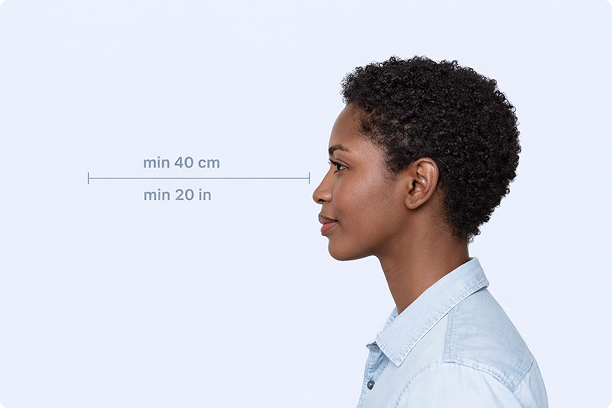
Correct Distance
Hold your camera at arm's length (40cm/20in minimum) for the best results
_1768770085753-BWkNoFUp.jpg)
Face The Camera
Look straight at the camera with a neutral expression and eyes open
Even Lighting
Use natural light or soft indoor lighting to avoid shadows on your face
What You Get
Digital Photo
High-resolution JPEG for online applications
Print-Ready PDF
4x6 inch PDF with multiple copies and cut guides
Acceptance Guarantee
Full refund if your photo is rejected
Why Choose PassportApp?
Ready in 30 Seconds
Fast AI processing delivers your photo instantly.
Money Back Guarantee
Full refund if your application is rejected due to the photo.
Compliance Verified
Each photo is checked against official requirements.