UK Visa Photo (Online Alternative)
Verify your UK visa photo against all UKVI specifications before submitting your application. All visa types covered — spouse, student, work, family, and more.
- All UK visa types covered
- 99.8% approval rate
- UKVI-specific verification
- Unlimited retakes included
- £9.99 — one flat fee
- Results in under 2 minutes


Drag to compare before vs after
Photo Specifications
Will my photo be accepted?
Size
2x2 in
Lighting
No shadows
Focus
Sharp & clear
Background
Light grey or cream
Head height
29–34 mm
Recency
Last month
Online submission
Printable
How It Works
1. Upload Your Photo
Take a photo with your smartphone or webcam, or upload an existing image.
2. Image Processing
We remove the background, crop to exact specifications, and check against compliance.
3. Download & Print
Get your digital photo instantly, plus a print-ready PDF with cut guides.
A rejected visa photo doesn't just delay your photo — it delays your entire visa application. Unlike passport rejections where you find out quickly, visa photo issues can mean days of waiting for feedback while your timeline slips. PassportApp verifies your visa photo against all UK Visas and Immigration specifications before you submit, preventing delays.
How It Works
Take your photo at home or professionally. Upload it to PassportApp. Our system analyzes your photo against UKVI requirements: file format, file size, dimensions, orientation, background, framing, expression, and image quality. Verification completes within two minutes. If your photo passes, download immediately and use it with your visa application. If it needs adjustment, you get specific feedback on what to fix. Resubmit unlimited times at no extra cost.
UK Visa Photo Requirements
UK visa and immigration applications are processed by UKVI — UK Visas and Immigration. They set the photo rules, and they're slightly different from the passport photo rules set by HMPO. The most important difference is the file size cap: visa photos are limited to 6MB, not 10MB.
The 6MB limit.:
Most guides still quote 10MB — that's the passport photo limit. UKVI's guidance, updated in 2026, caps visa photos at 6MB. A high-res file from a photo service will often come in well under that, but check before uploading.
Can't reuse a passport photo.:
Your visa photo can't be the same image as the one in your current passport or identity card. Even if it meets every other requirement, UKVI won't accept the same capture twice. Take a new photo.
Upper body framing.:
Visa photos need to show more than passport photos — your head, shoulders and upper body, not just head and the tops of your shoulders. The difference is modest but the automated checker will flag a tightly cropped passport-only shot.
Portrait orientation.:
The photo must be upright. Landscape images and mirrored or flipped images are rejected. If you're shooting on a phone, make sure it's held vertically and the file hasn't been flipped in editing.
Is a Visa Photo the Same as a Passport Photo?
Mostly, but not entirely. The core specs — 600 × 750px minimum, light background, neutral expression, no glasses, one month old — are the same. But there are three differences that matter.
1. The file size cap.:
Passport photos: up to 10MB. Visa photos: up to 6MB. If you've got a verified passport photo file that's 8MB, it won't upload to a visa application. You'd need a compressed version or a fresh image.
2. You can't submit the same image.:
UKVI's guidance is explicit: the photo cannot be the same one as in your passport or ID card. Not a cropped version of it, not the same capture saved at a different resolution — a different photo entirely. If you're renewing a passport and applying for a visa around the same time, get two separate photos.
3. The framing is slightly wider.:
A passport photo crops to head and the top of the shoulders. A visa photo must include your head, shoulders and upper body. The difference is a few centimetres of clothing, but if your passport photo was cropped tightly, it may not pass the visa photo check.
The rules are set by two different parts of the Home Office. HMPO handles passports, UKVI handles visas. A photo accepted for a passport renewal won't automatically be accepted for a visa application — check the file size and don't reuse the same image.
Do I Need to Send a Photo With My UK Visa Application?
For most online applications, you upload one. You don't post printed photos.
Standard online applications.:
You upload a JPG or JPEG file during the application. The system runs an automated check before it accepts it. If it fails, it'll tell you what's wrong and let you try again before you proceed.
Visa application centres.:
Some applications — particularly those made outside the UK — require you to attend a visa application centre (VAC) for biometric enrolment. They take your fingerprints and photograph you there. You don't bring photos. Check whether your visa type requires a VAC appointment.
Children under 5.:
For some child visa applications, a printed photo is required — 35mm × 45mm, meeting standard UKVI requirements. The application guidance for the specific visa type will confirm if this applies.
If you're not sure what your application requires — digital upload, biometric appointment, or a printed photo — check the specific visa guidance on GOV.UK before you start. It varies by visa type and where you're applying from.
How to Take a UK Visa Photo at Home
UKVI accepts photos taken on a phone or tablet. They recommend having someone else take it rather than doing it yourself — not a rule, just sensible, because it's easier to get the head position and framing right when you're not holding the camera.
Background.:
Plain, light-coloured wall. No patterns, no texture, nothing visible behind you. Stand at least half a metre away from the wall so you don't cast a shadow on it. Magnolia, light grey, or cream all work.
Lighting.:
Face a window. Natural daylight from in front of you lights the face evenly and doesn't create shadows. Overhead lighting throws shadows under the nose and chin. Don't use the phone flash.
Distance.:
The photo needs to show your head, shoulders and upper body. Prop the phone against something or hand it to someone else. Selfies taken at arm's length almost always crop the frame wrong or make the head too small.
Expression.:
Neutral. Mouth closed. Eyes open and looking at the lens. Head straight — not tilted, not turned to the side. The camera should be at eye level.
Before you upload.:
Check the file format is JPG or JPEG. Check the file size is under 6MB. Don't crop, edit or filter it. Run it through a compliance check — it's easier to fix problems now than after you've submitted the application.
Quick checklist: - JPG or JPEG — not PNG or HEIC - 50KB to 6MB - 600 × 750 pixels minimum - Portrait orientation, not mirrored - Plain light background, no shadow - Head, shoulders and upper body visible - Neutral expression, mouth closed, eyes open - Glasses off if you can - Not the same photo as your passport - Taken within the last month
What Happens if My Visa Photo Is Rejected?
Most rejections happen at the upload stage. The automated checker flags the problem before you can submit, tells you what's wrong, and lets you upload a new image. You don't lose progress.
If a UKVI caseworker reviews your application after submission and flags the photo, you'll be contacted and asked to provide a new one. Your application fee isn't lost — you get the chance to correct it.
The most common reasons for rejection:
- Head too small or not centred - Background shadow, pattern or wrong colour - File is the wrong format — must be JPG or JPEG - File over 6MB - Same image as in your passport - Photo has been edited, filtered or the image flipped - Eyes not visible — hair in the way, or head covering casting a shadow
The automated checker on the visa application runs before you proceed. If your photo fails there, fix it then — don't try to push through with a photo you're unsure about. A rejection after submission adds time you may not have if you're working to a travel date.
All UK Visa Types Covered
PassportApp verifies photos for all UK visa categories: spouse and partner visas, student visas, skilled worker and other work visas, family visas (including children), visit visas, and settlement and ILR applications. We verify against UKVI specifications — not generic passport specs — so you know your photo meets the right standard for your specific application.
How to Prepare Yourself
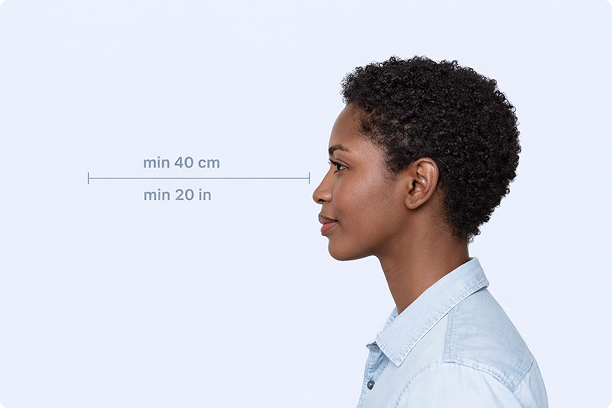
Correct Distance
Hold your camera at arm's length (40cm/20in minimum) for the best results
_1768770085753-BWkNoFUp.jpg)
Face The Camera
Look straight at the camera with a neutral expression and eyes open
Even Lighting
Use natural light or soft indoor lighting to avoid shadows on your face
What You Get
Digital Photo
High-resolution JPEG for online applications
Print-Ready PDF
4x6 inch PDF with multiple copies and cut guides
Acceptance Guarantee
Full refund if your photo is rejected
Why Choose PassportApp?
Ready in 30 Seconds
Fast AI processing delivers your photo instantly.
Money Back Guarantee
Full refund if your application is rejected due to the photo.
Compliance Verified
Each photo is checked against official requirements.