Canada Visa Photo Online
Create a compliant Canada visa photo online in minutes. Upload a photo from your phone and get a visa photo that meets all US State Department requirements.
- Correct 2x2 inch US visa photo size
- White background, State Department compliant
- Digital photo ready for online submission


Drag to compare before vs after
Photo Specifications
Will my photo be accepted?
Size
2x2 in
Lighting
No shadows
Focus
Sharp & clear
Background
white
Head height
—
Recency
Last 6 months
Online submission
Printable
How It Works
1. Upload Your Photo
Take a photo with your smartphone or webcam, or upload an existing image.
2. Image Processing
We remove the background, crop to exact specifications, and check against compliance.
3. Download & Print
Get your digital photo instantly, plus a print-ready PDF with cut guides.
Everything You Need to Know About US Visa Photos
A US visa photo is a mandatory part of almost every visa application submitted to the United States. Whether you are applying for a tourist visa, business visa, student visa, work visa, or immigrant visa, your application will not be processed unless your photo meets the official requirements set by the US Department of State.
Despite appearing simple, US visa photo requirements are among the strictest in the world. Even small mistakes—such as an incorrect background shade, poor lighting, or improper head positioning—can result in delays, additional requests, or outright rejection. This is why many applicants search for guidance on US visa photo requirements or look for a reliable alternative to visiting a photo booth.
This guide explains exactly what a US visa photo is, why the requirements exist, how to avoid common rejection reasons, and how to create a compliant digital US visa photo without leaving your home.
What Is a US Visa Photo?
A US visa photo is an official identification photograph used by US embassies, consulates, and immigration authorities to verify your identity. It forms part of your visa application and is stored digitally by the US government.
Every visa applicant must submit a photo, regardless of age. This includes adults, children, and babies. There are no age-based exemptions, and each applicant must meet the same core technical requirements.
The photo is reviewed using automated systems and manual checks, which is why accuracy matters. Photos that do not meet the technical standards are flagged quickly, often before the application is reviewed by a consular officer.
Which US Visas Require a Visa Photo?
Most non-immigrant and immigrant visa categories require a photo. This includes tourist visas (B-2), business visas (B-1), student visas (F and M), work visas (H, L, O, and others), exchange visas (J), and immigrant visas.
Even electronic visa systems that allow online submission still require a compliant digital photo. Uploading an incorrect image can prevent submission entirely or trigger a request for resubmission later in the process.
US Visa Photo Size and Format
The official US visa photo size is exactly 2x2 inches, which corresponds to 51x51 millimetres. The photo must be square, not rectangular, and must maintain the correct proportions.
For digital submissions, the photo must be high resolution and correctly scaled. At 301 DPI, the image contains sufficient detail for both digital processing and printing. Low-resolution images or photos that have been heavily compressed are commonly rejected.
Simply cropping an existing image to 2x2 inches is rarely sufficient. The head size and framing must also fall within acceptable ranges.
Head Size and Positioning
Head size is one of the most frequent causes of US visa photo rejection. The height of the head, measured from the bottom of the chin to the top of the head, should fall within the range specified by the US Department of State.
Your face must be centred in the frame, facing directly toward the camera. Both sides of your face should be visible, and your head must not be tilted or turned.
Photos where the head appears too large, too small, or positioned too high or low in the frame are routinely rejected, even if the image quality is otherwise acceptable.
Background Requirements for US Visa Photos
The background for a US visa photo must be plain white. Off-white, cream, grey, or coloured backgrounds are not accepted.
The background must be uniform, with no shadows, textures, patterns, or visible objects. Even subtle gradients or wrinkles in the background can cause automated checks to fail.
Many rejections occur due to background shadows created by overhead lighting or flash photography. Standing slightly away from the wall and facing natural daylight helps reduce this risk.
Lighting and Image Quality Standards
Your US visa photo must be clear, sharp, and evenly lit. Blurry images, grainy photos, or images taken in low light conditions are commonly rejected.
Harsh lighting can create glare, uneven skin tones, or shadows across the face. Flash photography is discouraged for this reason.
Natural daylight, such as standing in front of a window during the daytime, produces the most consistent and compliant results.
Facial Expression and Eye Visibility
A neutral facial expression is required for US visa photos. Your mouth must be closed, and your face should be relaxed.
Your eyes must be open and clearly visible. Hair must not cover the eyes, and there should be no glare or reflections obscuring them.
Smiling, frowning, or exaggerated expressions can alter facial features and increase rejection risk.
Glasses, Headwear, and Accessories
Glasses are generally not allowed in US visa photos. Even clear lenses can create reflections that obscure the eyes.
Medical exemptions exist, but they are strictly applied. If glasses are worn, there must be no glare, and the frames must not cover any part of the eyes.
Headwear is only permitted for religious reasons. In such cases, the full face must remain visible from the bottom of the chin to the top of the forehead, and the head covering must not cast shadows.
What to Wear for a US Visa Photo
Wear everyday clothing that contrasts with the white background. White or very light-coloured clothing can blend into the background, making it difficult to clearly define the shoulders.
Avoid uniforms or clothing that resembles official attire. The aim is a neutral, accurate representation of your everyday appearance.
Digital Alterations and Filters
Digital alterations are not allowed for US visa photos. Filters, beauty modes, skin smoothing, and facial reshaping can all lead to rejection.
Only basic cropping and background correction to meet official requirements are permitted. Any change that alters your natural appearance is not acceptable.
Why US Visa Photos Get Rejected
The most common rejection reasons include incorrect photo size, non-white backgrounds, visible shadows, incorrect head positioning, poor image quality, and non-neutral facial expressions.
Photos originally taken for social media or casual use often fail because they include subtle edits, incorrect framing, or unsuitable lighting.
Can You Take a US Visa Photo at Home?
Yes. Taking a US visa photo at home is often the most convenient and reliable option when done correctly.
Using a smartphone camera, natural daylight, and a plain white background allows you to control the most common rejection factors. Being able to take multiple photos and select the best one significantly improves acceptance rates.
US Visa Photo vs US Passport Photo
US visa photos and US passport photos share many similarities, including size and background requirements. However, they are submitted through different systems and should not always be reused interchangeably.
When applying for a visa, it is safest to use a photo prepared specifically for visa submission.
Why Many Applicants Avoid Photo Booths
Photo booths often provide limited attempts, fixed lighting, and no compliance feedback. These limitations increase rejection risk for US visa photos.
Online photo options allow greater flexibility, multiple attempts, and better alignment with State Department requirements.
Final Thoughts on US Visa Photos
A US visa photo may seem like a small detail, but it plays a critical role in your application. Errors can cause delays that affect travel plans, work opportunities, or study start dates.
By understanding and following the official requirements, you can submit a compliant photo that helps your visa application move forward smoothly and without unnecessary stress.
Other Canada Document Photos
How to Prepare Yourself
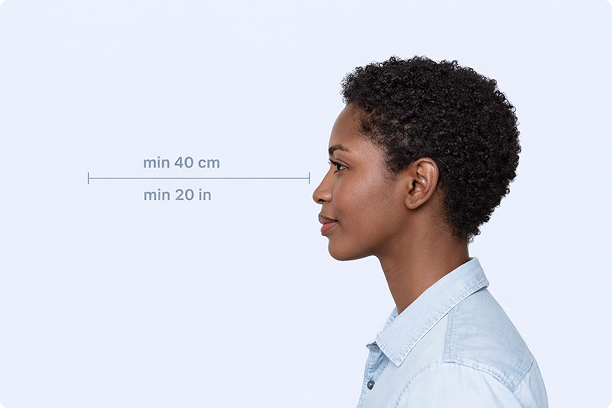
Correct Distance
Hold your camera at arm's length (40cm/20in minimum) for the best results
_1768770085753-BWkNoFUp.jpg)
Face The Camera
Look straight at the camera with a neutral expression and eyes open
Even Lighting
Use natural light or soft indoor lighting to avoid shadows on your face
What You Get
Digital Photo
High-resolution JPEG for online applications
Print-Ready PDF
4x6 inch PDF with multiple copies and cut guides
Acceptance Guarantee
Full refund if your photo is rejected
Why Choose PassportApp?
Ready in 30 Seconds
Fast AI processing delivers your photo instantly.
Money Back Guarantee
Full refund if your application is rejected due to the photo.
Compliance Verified
Each photo is checked against official requirements.