Canadian Passport Photo (2026)
Get an IRCC-compliant Canadian passport photo. Correct 50×70mm format, precise 31–36mm face height, plain white background — and full guidance on the Photographer Note and guarantor requirements unique to Canadian passports.
- 50×70mm IRCC-compliant format
- Face 31–36mm from chin to crown
- Plain white background
- Photographer Note included
- CAD $13.99 — no hidden costs
- Full IRCC compliance or refund


Drag to compare before vs after
Photo Specifications
Will my photo be accepted?
Size
50x70 mm
Lighting
No shadows
Focus
Sharp & clear
Background
white
Head height
—
Recency
Last 6 months
Online submission
Printable
How It Works
1. Upload Your Photo
Take a photo with your smartphone or webcam, or upload an existing image.
2. Image Processing
We remove the background, crop to exact specifications, and check against compliance.
3. Download & Print
Get your digital photo instantly, plus a print-ready PDF with cut guides.
Canadian passport photos follow the IRCC 50×70mm format — wider and taller than the US 2×2 inch square, and larger than the UK 35×45mm. Getting this right matters: IRCC photo reviewers reject applications for wrong size, face height out of range, missing Photographer Note, and photos edited with software or AI. Canada is one of the few countries that explicitly names AI tools as a prohibited alteration method. This page sets out the complete IRCC requirements and explains what the guarantor and Photographer Note rules actually mean for your application.
Canadian passport photo specifications at a glance
| Requirement | Spec | Note |
|---|---|---|
| Photo size | 50mm wide × 70mm high | Unique to Canada. NOT the US 2×2 inch (51×51mm) square. |
| Face height | 31–36mm chin to crown | Measured to crown of skull, not top of hair. #1 rejection reason. |
| Background | Plain white or light-coloured | No shadows, no patterns, no gradients. |
| Expression | Neutral. Mouth closed. Eyes open. | No smiling. Looking directly at camera. |
| Glasses | Not permitted | No prescription, reading, or tinted lenses. Contacts are fine. |
| Recency | Within the last 6 months | Must reflect current appearance. |
| Quantity | Two identical unaltered photos | Same session. Online renewal: one digital JPEG file. |
| Photographer | Commercial photographer required | Home-taken photos not accepted. Photographer Note on back. |
| Clothing | Avoid white — blends into background | Wear dark or medium colours. Navy, black, charcoal recommended. |
| Editing/AI | Strictly prohibited by IRCC | No software, no filters, no AI tools. Any alteration = rejection. |
| Colour | Colour or black and white | Both accepted. |
| Paper (prints) | Professional photo paper only | No home-printed or heavyweight paper. |
Canadian passport photos are NOT the same as US passport photos.:
The US format is 51×51mm (2×2 inches) — a square. The Canadian format is 50×70mm — taller and portrait-orientation. If you use a US-format photo tool or a pharmacy that defaults to US specs, your photo will be rejected. Always confirm "Canadian passport photo, 50×70mm" before paying. Shoppers Drug Mart, Walmart Photo Centre, and London Drugs know the Canadian format explicitly.
The AI editing ban: what IRCC prohibits
Canada.ca states explicitly: "The photo must not be altered in any way. Altering includes using photo-editing software, filters, or AI tools. We will reject your application if the photo has been altered in any way."
This includes: - Background removal and replacement (even to white) - Skin tone corrections, smoothing, or enhancements - Brightness, contrast, or saturation adjustments - Red-eye removal - Sharpening or blur adjustments - Resizing or cropping by non-photographer tools - Any AI-based facial or image enhancement
This matters more for Canadian passport photos than for most other countries. IRCC reviewers are trained to identify edited photos, and Canada explicitly names AI tools as prohibited.
What PassportApp does differently:
PassportApp does not alter your facial features, skin tone, or expression. Our human experts review your photo against IRCC exact specifications: face height 31–36mm, white background, neutral expression, no glasses. We provide a Photographer Note with our studio name, address, and the date. We do not run AI filters on your face. The photo you submit to IRCC is the photo you took.
The Photographer Note: what goes on the back of your photo
The Photographer Note is the single most common cause of Canadian passport application rejection unrelated to the photo itself. IRCC requires that the back of each printed photo includes specific information from the photographer — handwritten in pen or stamped. Stick-on labels are not accepted.
What must be written or stamped on the back of both photos:
1. The photographer's name or studio name 2. The complete studio address 3. The date the photo was taken
All three fields are required. Missing even one is grounds for rejection.
PassportApp includes a complete Photographer Note with every order:
our studio name, complete address, and the date of your photo session, suitable for printing on the back of your photos. This meets the IRCC Photographer Note requirement for printed applications (in-person and mail).
| What | Which photo | Details |
|---|---|---|
| Photographer Note | Both photos | Studio name, complete address, date taken. Pen or stamp. No stick-on labels. |
| Guarantor signature | One photo only (not both) | First-time applicants only. Guarantor does NOT sign the second photo. |
| Second photo (back) | Left blank | Photographer Note required. No guarantor signature. |
Guarantor: who needs one, who doesn't
Most people renewing a passport do NOT need a guarantor on their photo.:
Canada.ca states: "If you're renewing an adult passport, you do not need a guarantor."
The guarantor signature on the back of the photo is only required for first-time passport applications (form PPTC 153). For standard adult renewals (form PPTC 054) where your name has not changed and your previous passport has not been expired for more than one year, no guarantor signature is required.
You must use the full application (PPTC 153) and need a guarantor if:
- Your previous passport expired more than 1 year ago - Your legal name changed since your last passport - You are applying for a child's passport (children under 16 always use the full form) - Your citizenship was granted or restored after your last passport was issued
For first-time applicants — what the guarantor must do:
Sign the back of one photo only (not both). Write: "I certify this to be a true likeness of [your full name]." Include their name, signature, date, and valid Canadian passport number.
Who qualifies:
As of recent IRCC guidance, any person who has known you personally for at least 2 years and holds a valid Canadian passport (or one expired within the last year) can serve as guarantor, including family members or household members. Confirm with current canada.ca requirements before submitting.
Digital photo requirements for online passport renewal
Canada offers online adult passport renewal for eligible applicants. Instead of printed photos, you upload a digital JPEG file. The biometric requirements are identical to printed photos — same face height, same background, same expression. Additional rules for the digital file:
| Requirement | Spec | Note |
|---|---|---|
| File format | JPEG or JPG only | Saved directly from the camera file. No scanned prints. |
| Orientation | Portrait, 3:2 ratio | IRCC online renewal spec is portrait-format JPEG. |
| Alteration | Not permitted | No editing, no filters, no AI tools. Same as printed photos. |
| Taken by | Commercial photographer | Digital file must come from a professional, not a selfie. |
| Recency | Within 6 months | Same as printed photos. |
| Background | Plain white | Must be original capture, not replaced. |
Do not scan a printed photo for your digital upload.:
Canada.ca explicitly states: "We don't accept scanned copies of printed photos." If you have printed photos from a previous session and want to renew online, you need a new digital file taken by a commercial photographer, saved from the camera without editing. PassportApp provides the unedited original digital file from our professional session, suitable for the IRCC online renewal portal.
Where to get a Canadian passport photo
Canadian passport photos must be taken by a commercial photographer. Home-taken photos are not accepted.
| Provider | Approx. price | Notes |
|---|---|---|
| PassportApp | CAD $13.99 | Online. Human expert review. IRCC compliance guaranteed. Photographer Note included. Results in minutes. |
| Costco Photo Centre | CAD $5–8 | Members only. Most Costco locations. Cheapest in-store option. |
| Walmart Photo Centre | CAD $10–15 | Most Walmart locations. Same-day. Confirm Canadian spec (50×70mm) before paying. |
| Staples / Bureau en Gros | CAD $14–18 | Nationwide. Quick turnaround. |
| London Drugs | CAD $15 | BC, AB, SK, MB. Explicitly advertises Canadian spec. |
| Shoppers Drug Mart | CAD $15–25 | Most locations across Canada. Explicitly knows 50×70mm. |
| Canada Post | CAD $18–22 | Most locations. Convenient for mail-in applicants. |
| Independent photo studios | CAD $25–50 | Most reliable for non-standard cases (religious coverings, medical). |
Always confirm "Canadian passport photo, 50×70mm" before paying any in-person provider.:
Many Canadian pharmacies and print shops also serve US customers. If you do not specify the Canadian format, some staff may default to the US 2×2 inch (51×51mm) format, especially near the border.
Top reasons IRCC rejects Canadian passport photos
| Rejection reason | Detail | Caught by |
|---|---|---|
| Wrong size | Photo is not 50×70mm — most often a US 2×2 photo submitted | Automatic |
| Face height out of range | Face measures less than 31mm or more than 36mm from chin to crown | Automatic |
| Photo edited or AI-altered | Any use of software, filters, or AI tools | IRCC reviewer |
| Missing Photographer Note | Back of photo lacks studio name, address, or date | IRCC reviewer |
| Incorrect Photographer Note | Stick-on label used; information incomplete | IRCC reviewer |
| Glasses visible | Prescription or fashion glasses worn | IRCC reviewer |
| White clothing | Clothing blends into white background | IRCC reviewer |
| Shadows | Shadows on background or face | IRCC reviewer |
| Not taken by commercial photographer | Selfie or home-taken photo | IRCC reviewer |
| Scanned print used for digital upload | Online renewal submitted with scan of printed photo | System |
| Photo older than 6 months | Does not reflect current appearance | IRCC reviewer |
| Missing guarantor signature | First-time applicants only: guarantor not signed back of one photo | IRCC reviewer |
Baby and child passport photos
Children's passport photos follow the same 50×70mm size and 31–36mm face height requirements as adult photos.
Infants under 1 year:
Eyes may be closed (explicit IRCC exception). Newborns can be photographed lying on a plain white sheet from above if they cannot sit independently. No adult hands or objects visible in the frame.
Children over 1 year:
Eyes must be open. Neutral expression required — same rules as adults. Child must appear alone. No hands visible at the edges of the frame.
Important:
Self-service photo booths are not appropriate for babies under approximately 4 years. A staffed photographer is strongly recommended — getting the correct 31–36mm face height for a baby who cannot sit still requires professional equipment. A staffed photographer can also provide the required Photographer Note.
See also: Canadian baby passport photo guide
Other Canada Document Photos
How to Prepare Yourself
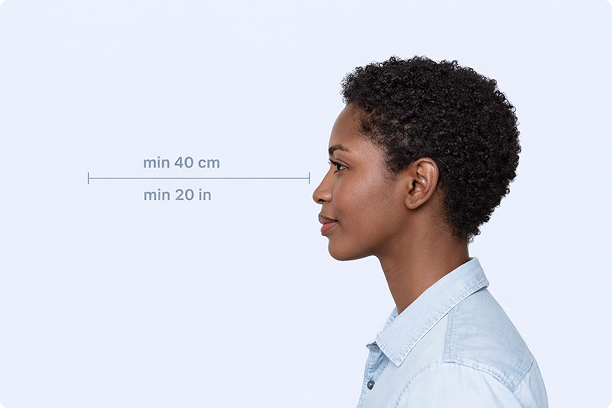
Correct Distance
Hold your camera at arm's length (40cm/20in minimum) for the best results
_1768770085753-BWkNoFUp.jpg)
Face The Camera
Look straight at the camera with a neutral expression and eyes open
Even Lighting
Use natural light or soft indoor lighting to avoid shadows on your face
What You Get
Digital Photo
High-resolution JPEG for online applications
Print-Ready PDF
4x6 inch PDF with multiple copies and cut guides
Acceptance Guarantee
Full refund if your photo is rejected
Why Choose PassportApp?
Ready in 30 Seconds
Fast AI processing delivers your photo instantly.
Money Back Guarantee
Full refund if your application is rejected due to the photo.
Compliance Verified
Each photo is checked against official requirements.