Australian Passport Photo (Online Alternative)
Get an Australian passport photo that meets every DFAT specification. Correct 35×45mm size, precise head sizing, plain background — and guidance on the countersigning requirement unique to Australian passports.
- 35×45mm DFAT-compliant
- Head 32–36mm from chin to crown
- Plain white/light grey background
- Countersigning guidance included
- A$17.99 — no hidden costs
- Near-zero rejection risk


Drag to compare before vs after
Photo Specifications
Will my photo be accepted?
Size
35x45 mm
Lighting
No shadows
Focus
Sharp & clear
Background
Plain white
Head height
32–36 mm
Recency
Last 6 months
Online submission
Printable
How It Works
1. Upload Your Photo
Take a photo with your smartphone or webcam, or upload an existing image.
2. Image Processing
We remove the background, crop to exact specifications, and check against compliance.
3. Download & Print
Get your digital photo instantly, plus a print-ready PDF with cut guides.
The Department of Foreign Affairs and Trade (DFAT) enforces strict biometric standards for Australian passport photos aligned with international ICAO guidelines. A single technical error — wrong size, poor lighting, a shadow, a slight smile — causes rejection and delays your entire application. Australia also has a unique requirement found in few other countries: one of your two submitted photos must be countersigned on the back by an Australian citizen who has known you for at least 12 months.
DFAT Photo Specifications
Size:
35–40mm wide × 45–50mm high. Australian passport photos are smaller than US (2×2 inch) and UK (35×45mm) photos — approximately 1.4×1.8 inches.
Head size:
32–36mm from chin to crown. Your head must fill approximately 70–80% of the frame. Even 2–3mm off causes rejection — accuracy is critical.
Digital photos:
For online visa applications through ImmiAccount, 826×1062 pixels at 300 DPI. For passport applications, you must submit two identical printed photos on glossy photographic paper.
Background:
Plain white or very light grey, no patterns, textures, colours, shadows, or objects. Evenly lit with no dark areas. DFAT's facial recognition systems depend on clear face-to-background contrast.
Expression:
Neutral with mouth closed. Eyes fully open, looking directly at the camera. Head straight — not tilted, turned, or angled.
Glasses:
Not permitted. No exceptions, no medical waivers. Use contact lenses for your passport photo.
Head coverings:
Only for daily religious practice, with full face visible from hairline to chin.
Recency:
Taken within the last 6 months. If your appearance has changed significantly, a new photo may be required even within 6 months.
Photo quality:
Sharp, clear, natural skin tones, no red-eye, blur, pixelation, beauty filters, or AI enhancement. The photo must be a true likeness of how you normally appear.
The Countersigning Requirement
Australian passports require one of your two submitted photos to be countersigned on the back — a requirement unique among most countries.
Who can countersign:
Any Australian citizen aged 18+ who has known you continuously for at least 12 months. They cannot be a close relative living at your same address. Employers, colleagues, community members, and friends are all acceptable.
What they write:
On the back of one photo: "I certify that this is a true likeness of [your full name]", followed by their printed name, signature, date, occupation, contact phone number, and residential address.
Why it exists:
It's a fraud prevention mechanism to verify that your photo actually represents you and hasn't been altered. Without a valid countersignature, your application is rejected.
Plan ahead:
Think about who you'll ask before you're ready to submit. If you're new to Australia or relocating, consider an employer, trusted colleague, or community leader. One countersigned photo + one plain photo is what you submit — both must be identical.
Where to Get Australian Passport Photos
Australia Post ($15–25):
Nationwide locations trained on DFAT requirements with standardized equipment and lighting. Same-day service usually available. Recommended for convenience and reliability.
Officeworks ($10–20):
Photo printing services in many locations. Some provide compliance certificates confirming your photos meet DFAT requirements. Call ahead to confirm availability.
Pharmacy chains (Chemist Warehouse, Priceline) ($15–25):
Similar to Australia Post. Quality and availability vary — call ahead to confirm.
Specialist photography studios ($40–80):
Highest quality, lowest rejection risk. They understand DFAT requirements intimately and ensure perfect lighting, background, and framing. Recommended if you want absolute certainty.
Online verification ($17.99):
Upload a self-taken photo; a professional verifies it against DFAT specifications. If compliant, you receive a verified digital file ready to print. If not, you get specific feedback and resubmit until verified. Near-zero rejection risk.
DIY at home:
Permitted but higher rejection rates due to background shadows, incorrect head sizing, or lighting issues. Only attempt if you're comfortable with photography.
Common Australian Passport Photo Rejection Reasons
Head size out of range (28% of rejections):
Head measures less than 32mm or more than 36mm from chin to crown. Too close to camera = too large; too far = too small. Even 2–3mm off causes rejection.
Shadows on background (22% of rejections):
Even subtle shadows detected by DFAT's facial recognition systems cause rejection. Iron backdrops flat, use even lighting.
Background not plain white/light grey (18% of rejections):
Off-white, cream, light blue, or any pattern. DFAT requires pure white or very light grey — no variation.
Glasses visible (15% of rejections):
No exceptions, no medical waivers. Remove glasses; use contacts.
Expression not neutral (12% of rejections):
Even a slight smile causes rejection. Completely neutral expression required.
Poor lighting or face shadows (10% of rejections):
Shadows under eyes, uneven lighting, face too dark or too bright.
Photo too old or photos not identical (5% each):
Photo older than 6 months, or two submitted photos differ in any way — background, lighting, expression, or framing.
Baby and Child Photo Requirements
Under 3 months:
Eyes can be closed or partially open. Slight head tilts acceptable. White sheet method recommended — lie baby on their back on a plain white ironed sheet and photograph from above.
3–12 months:
Eyes should ideally be open but relaxation still permitted. Slight head tilts fine. Special infant accommodations apply until 12 months.
1–3 years:
Requirements become stricter — eyes must be open, face the camera. Natural smiles acceptable. No toys, pacifiers, or objects in frame.
3+ years:
Full adult requirements apply.
Universal rule for all ages:
The child must appear completely alone. No parent hands, no parent face in background, no one touching the child anywhere in the frame. This single requirement causes most child photo rejections.
See the dedicated baby passport photo guide for full white sheet method instructions and age-specific guidance.
Other Australia Document Photos
How to Prepare Yourself
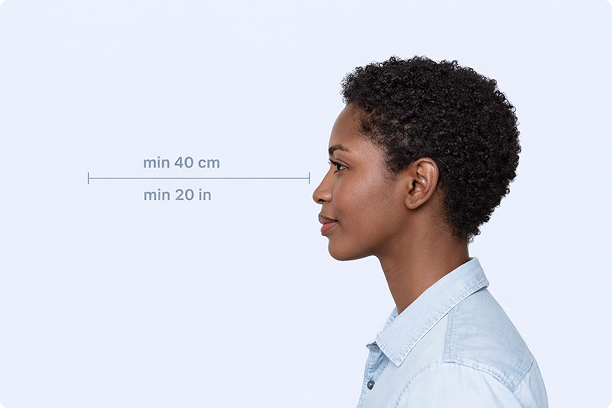
Correct Distance
Hold your camera at arm's length (40cm/20in minimum) for the best results
_1768770085753-BWkNoFUp.jpg)
Face The Camera
Look straight at the camera with a neutral expression and eyes open
Even Lighting
Use natural light or soft indoor lighting to avoid shadows on your face
What You Get
Digital Photo
High-resolution JPEG for online applications
Print-Ready PDF
4x6 inch PDF with multiple copies and cut guides
Acceptance Guarantee
Full refund if your photo is rejected
Why Choose PassportApp?
Ready in 30 Seconds
Fast AI processing delivers your photo instantly.
Money Back Guarantee
Full refund if your application is rejected due to the photo.
Compliance Verified
Each photo is checked against official requirements.