Australian Visa Photo (Online Alternative)
Get an Australian visa photo optimised for ImmiAccount upload. Correct JPEG format, under 500 KB, 826×1062px, white background — verified against Department of Home Affairs specifications before you submit.
- 826×1062px JPEG for ImmiAccount
- Under 500 KB file size
- Plain white/light grey background
- Works for all visa subclasses
- A$17.99 — no hidden costs
- Near-zero ImmiAccount rejection


Drag to compare before vs after
Photo Specifications
Will my photo be accepted?
Size
2x2 in
Lighting
No shadows
Focus
Sharp & clear
Background
Plain white
Head height
32–36 mm
Recency
Last 6 months
Online submission
Printable
How It Works
1. Upload Your Photo
Take a photo with your smartphone or webcam, or upload an existing image.
2. Image Processing
We remove the background, crop to exact specifications, and check against compliance.
3. Download & Print
Get your digital photo instantly, plus a print-ready PDF with cut guides.
Most Australian visas are now applied for through ImmiAccount, the Department of Home Affairs online portal. When you upload your visa photo, an automated system performs 12+ compliance checks instantly — if any check fails, you cannot proceed with your application. Understanding the digital specifications in advance prevents repeated rejections and delays to your visa processing.
Australian Visa Photo Specifications
Australian visa photos follow the same basic specifications as passport photos — 35×45mm, same head sizing, same background requirements — but with important digital differences for ImmiAccount.
Physical dimensions:
35–40mm wide × 45–50mm high, head 32–36mm from chin to crown.
Digital file for ImmiAccount:
JPEG format, 826×1062 pixels at 300 DPI, under 500 kilobytes. ImmiAccount accepts JPEG only — PNG, HEIC, and other formats are rejected immediately.
File size limit:
Under 500 KB. Modern smartphone photos often exceed this. Compress your JPEG before uploading.
Background:
Plain white or very light grey, no patterns, shadows, textures, or objects. Evenly lit with no shadows on face or background.
Expression:
Neutral with mouth closed. Eyes fully open looking directly at camera. Head straight.
Glasses:
Not permitted. Head coverings only if worn daily for religious reasons with full face visible.
Recency:
Taken within the last 6 months.
ImmiAccount Automated Validation
ImmiAccount performs 12+ automated checks when you upload your visa photo. If any check fails, the system blocks your application from proceeding.
What ImmiAccount checks:
Face detection, exact dimensions and aspect ratio, file size and format (JPEG only), head positioning and centering, head size measurement (32–36mm), background uniformity and colour (white/light grey only), lighting consistency (no shadows), facial visibility (full face from hairline to chin), expression (neutral), eyes (open and visible), and overall image quality.
If your photo fails:
The system shows an error code identifying the specific problem — e.g., "image dimensions incorrect", "background not acceptable", "file size exceeds limit". Fix the specific issue and resubmit. There's no limit on resubmissions, but each rejection delays completing your application.
Visa subclass variations:
Most Australian visas use identical photo specifications through ImmiAccount — student visas (500), skilled visas (189, 190, 491), work visas, partner visas. A small number of subclasses may vary. Check the Department of Home Affairs website for your specific subclass if uncertain.
Visa Types and Photo Requirements
Student visas (subclass 500):
Standard 35×45mm requirements, submitted digitally through ImmiAccount. One photo required.
Skilled migration visas (189, 190, 491):
Identical specifications through SkillSelect or ImmiAccount. Photos checked against biometric standards for facial recognition.
Work visas (TSS, SESR, etc.):
Same specifications, digital submission, ImmiAccount automated checks.
Partner visas (309, 820, 801, 100):
Same photo requirements. May require additional relationship photos (different specifications — check subclass-specific guidance).
Tourist visas (subclass 600):
Standard requirements for most applicants. Applicants from countries with biometrics agreements (India, China, etc.) provide additional biometric photos at Australian Visa Application Centres (AVACs).
Biometrics requirement:
Applicants from certain countries (India, China, UAE, Pakistan, etc.) must provide fingerprints and biometric photos at an AVAC. Your main application photo is submitted through ImmiAccount as normal; the biometric appointment is scheduled during processing.
Common ImmiAccount Photo Rejection Reasons
File size exceeds 500 KB (35% of rejections):
The most common failure. Smartphone photos often exceed this. Compress your JPEG to under 500 KB while maintaining image quality.
Dimensions incorrect (25% of rejections):
Image outside 826×1062 pixels or incorrect aspect ratio. Resize your image to exactly these dimensions before uploading.
Background issues (20% of rejections):
Not plain white or light grey, has shadows, or visible imperfections. Even subtle shadows cause rejection.
Head positioning or size (12% of rejections):
Head too large, too small, off-centre, or tilted. Must be 32–36mm from chin to crown, centered in frame.
Expression or eye issues (8% of rejections):
Smiling, mouth open, eyes not fully open. ImmiAccount's automated system is strict about neutral expression.
Other Australia Document Photos
How to Prepare Yourself
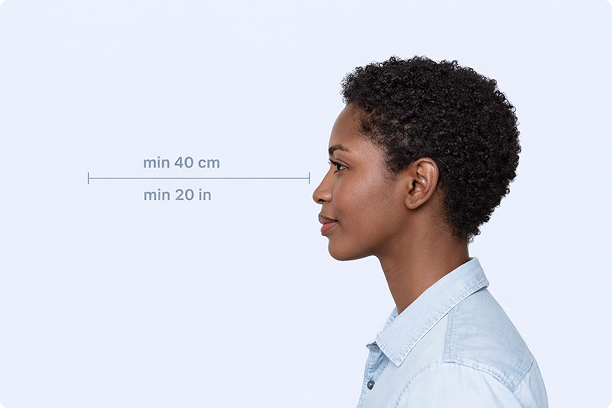
Correct Distance
Hold your camera at arm's length (40cm/20in minimum) for the best results
_1768770085753-BWkNoFUp.jpg)
Face The Camera
Look straight at the camera with a neutral expression and eyes open
Even Lighting
Use natural light or soft indoor lighting to avoid shadows on your face
What You Get
Digital Photo
High-resolution JPEG for online applications
Print-Ready PDF
4x6 inch PDF with multiple copies and cut guides
Acceptance Guarantee
Full refund if your photo is rejected
Why Choose PassportApp?
Ready in 30 Seconds
Fast AI processing delivers your photo instantly.
Money Back Guarantee
Full refund if your application is rejected due to the photo.
Compliance Verified
Each photo is checked against official requirements.