Australian Driving Licence Photo (Online Alternative)
Your Australian driver's licence photo is taken at the licensing centre — you can't submit your own. This guide covers what each state requires, how to prepare, and how to look your best on the day.
- NSW, VIC, QLD & all states covered
- Licensing centre process explained
- Photo specifications by state
- Preparation tips for best results
- Retake and replacement guidance
- Free information guide


Drag to compare before vs after
Photo Specifications
Will my photo be accepted?
Size
35x45 mm
Lighting
No shadows
Focus
Sharp & clear
Background
Plain white
Head height
32–36 mm
Recency
Last 6 months
Online submission
Printable
How It Works
1. Upload Your Photo
Take a photo with your smartphone or webcam, or upload an existing image.
2. Image Processing
We remove the background, crop to exact specifications, and check against compliance.
3. Download & Print
Get your digital photo instantly, plus a print-ready PDF with cut guides.
Unlike passports and visas where you control the photo, your Australian driver's licence photo is taken by licensing authority staff at their service centre. You cannot submit your own photo or hire a professional photographer. Understanding what to expect and how to prepare gives you the best chance of a photo you're happy with.
How Australian Driver's Licence Photos Work
Australia has no national identity card, making the driver's licence the universal photo ID for everyday situations — age verification, banking, employment, government services, and domestic travel.
Each state and territory issues its own licence: - NSW: Roads and Maritime Services (RMS) - VIC: VicRoads - QLD: Transport and Main Roads (TMR) - SA, WA, NT, TAS, ACT: Each state's transport authority
All licences are mutually recognised nationally under uniform arrangements since 1997. Specifications are consistent across all states: 35–40mm × 45–50mm photo dimensions, white or light grey background, neutral expression, eyes open, head straight, even lighting.
The key difference from passports:
Staff at the licensing centre photograph you. The process takes under one minute. You sit for the photo against a standardised plain light background. You cannot bring your own photo or request a professional image.
State-by-State Licensing Process
New South Wales (RMS):
Visit an RMS service centre for licence application or renewal. Staff photograph you using standardised equipment. You can request a retake if unhappy, though not all centres approve retakes easily. Licences valid for several years depending on age and licence type.
Victoria (VicRoads):
Photography at VicRoads service centre during appointment. Process is standardised. VicRoads photos are used for facial recognition systems, so a clear frontal photo is important. Request a retake if unhappy — availability varies by centre.
Queensland (TMR):
TMR takes your photo at their service centre. Process is quick and standardised. Retake availability varies by location.
All other states (SA, WA, NT, TAS, ACT):
Similar standardised processes. Photography at licensing centre, same 35–40mm × 45–50mm specifications, white/light grey background, identical ICAO biometric standards. Applicants cannot submit their own photos in any state.
How to Prepare for Your Licensing Photo
Since you can't control the final image, preparation is everything.
Physical preparation:
Sleep well the night before — alert, clear eyes photograph better. Stay hydrated. Eat a light meal so you're comfortable and focused.
Appearance:
Shower or freshen up the morning of your appointment. Style your hair naturally away from your face. If you wear makeup, use natural makeup that represents your everyday appearance — avoid heavy or theatrical makeup. Wear clothing that contrasts with the light background: avoid white, cream, and very light colours. Dark or mid-tone clothing works well. Wear something you feel confident in.
Glasses:
Licensing staff typically ask you to remove glasses for clear eye visibility. If medically necessary, discuss with the photographer. Contact lenses are acceptable.
Mental preparation:
Licensing staff photograph thousands of people per year — they're focused on technical requirements, not judging your appearance. Arrive a few minutes early so you're not rushed. Take a breath, look at the camera, think of something that makes you feel calm. A natural, composed expression photographs better than visible stress or a forced smile.
Retakes and Replacement Licences
Requesting a retake:
Request immediately after seeing your photo. Policies vary by state and centre — some allow retakes freely, others charge a fee or limit them. Don't wait until you've left the centre.
Replacement licences:
If you're unhappy with your licence photo after receiving it, you can apply for a replacement licence (usually $50–100+) which requires a new photo. You're essentially paying for another photo appointment.
Recommendation:
Invest in preparation before your initial appointment. A replacement licence costs considerably more than the effort of looking your best on the day.
When you must get a new licence photo:
- Each time you renew (typically every 5–10 years depending on age and state) - If your appearance changes significantly (significant weight change, major facial change) - Lost or damaged licence replacement - Name change requiring a new licence
Other Australia Document Photos
How to Prepare Yourself
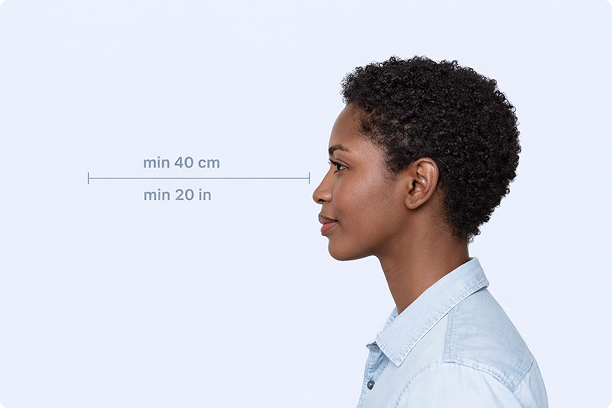
Correct Distance
Hold your camera at arm's length (40cm/20in minimum) for the best results
_1768770085753-BWkNoFUp.jpg)
Face The Camera
Look straight at the camera with a neutral expression and eyes open
Even Lighting
Use natural light or soft indoor lighting to avoid shadows on your face
What You Get
Digital Photo
High-resolution JPEG for online applications
Print-Ready PDF
4x6 inch PDF with multiple copies and cut guides
Acceptance Guarantee
Full refund if your photo is rejected
Why Choose PassportApp?
Ready in 30 Seconds
Fast AI processing delivers your photo instantly.
Money Back Guarantee
Full refund if your application is rejected due to the photo.
Compliance Verified
Each photo is checked against official requirements.