New Zealand Passport Photo (Online Alternative)
Get a New Zealand passport photo meeting every MBIE specification — including the distinctive light grey background requirement. Verified against DIA biometric standards before you submit.
- Light grey background (not white)
- No-selfies rule complied with
- 35×45mm, head 32–36mm
- JPEG 250 KB–5 MB digital
- NZ$18.99 — no hidden costs
- Near-zero rejection risk


Drag to compare before vs after
Photo Specifications
Will my photo be accepted?
Size
35x45 mm
Lighting
No shadows
Focus
Sharp & clear
Background
Light grey or off-white
Head height
29–34 mm
Recency
Last 6 months
Online submission
Printable
How It Works
1. Upload Your Photo
Take a photo with your smartphone or webcam, or upload an existing image.
2. Image Processing
We remove the background, crop to exact specifications, and check against compliance.
3. Download & Print
Get your digital photo instantly, plus a print-ready PDF with cut guides.
New Zealand has specific passport photo requirements that differ from most countries — and they catch many applicants off guard. The most distinctive: the background must be plain light grey, explicitly NOT white. This is the opposite of nearly every other developed nation. New Zealand also has a strict no-selfies rule: your photo must be taken by another person standing approximately 1.5 metres away. Getting these right is essential to avoid rejection.
The Distinctive Light Grey Background Requirement
New Zealand's most unique passport photo requirement is one that immediately distinguishes it from nearly every other country: the background must be plain light grey, explicitly not white.
MBIE specifies a light background that is not white, with light grey being the most commonly used and accepted colour. The reasoning: New Zealand's biometric facial recognition system works more effectively with light grey backgrounds than pure white. White backgrounds can reflect light differently and cause facial feature recognition issues in New Zealand's automated system.
What 'light grey' means in practice:
Light grey is not silver, charcoal, or medium grey. It's a pale, subtle grey sitting between white and true grey. Most New Zealand professional photographers understand this requirement. When requesting a photo, explicitly ask for "light grey background, not white" — international or inexperienced photographers may default to white.
Using white instead of light grey is the single most common reason New Zealand passport photos are rejected.
The No-Selfies Rule
The New Zealand Government does NOT accept selfies for passport photos because they distort facial proportions. Your photo must be taken by another person standing approximately 1.5 metres away from you.
This requirement is absolute and non-negotiable. You cannot take a selfie, use a tripod with a timer, or take a self-portrait using any method. The photo must be taken by another person.
Why this matters:
Selfies inherently distort facial proportions — the camera is too close, creating angles that don't represent your true appearance. New Zealand's biometric system depends on accurate facial proportions for border control and identification. The 1.5-metre distance ensures correct facial geometry for automated facial recognition.
Full Photo Specifications
Size:
35mm wide × 45mm tall. Head from chin to crown should fill 70–80% of the photo height (approximately 32–36mm).
Digital submissions:
900–4500 pixels wide, 1200–6000 pixels high, JPEG format, 250 KB–5 MB file size. Photos must be native digital — not scanned.
Background:
Plain light grey (not white). No patterns, textures, shadows, or objects visible. Completely uniform.
Expression:
Neutral, mouth closed. Eyes open and looking directly at the camera. Head straight — no tilt whatsoever. No smiling, no slight expressions.
Camera position:
Lens must be at your eye level, not from above or below.
Glasses:
Prescription glasses acceptable only if no glare or tint. Sunglasses not permitted.
Recency:
Taken within the last 6 months, accurately representing your current appearance.
Quality:
Sharp, in focus, no line softening, no filter application, no AI enhancement. Minimum 600 DPI for printed photos.
Where to Get New Zealand Passport Photos
NZ Post Offices (NZ$15–20):
Nationwide availability, trained on New Zealand's specific requirements including light grey background and no-selfies rule. Same-day service.
AA Centres (NZ$15–20):
Nationwide availability, similar to NZ Post, experience with New Zealand requirements.
Professional photography studios (NZ$40–100):
Portrait photographers in Auckland, Wellington, and Christchurch understand New Zealand's unique requirements. Highest quality, lowest rejection risk.
Online verification services (NZ$18.99):
Upload your self-taken photo; a professional verifies it against MBIE specifications — including light grey background verification and no-selfies compliance check. If compliant, you receive a verified digital file. If not, you get feedback to adjust.
DIY at home:
Someone else takes the photo from 1.5 metres away against a light grey background. Higher rejection risk — using white instead of light grey is the most common DIY error.
Common Rejection Reasons
Background not light grey (35% of rejections):
Applicants use white instead of light grey. Always specify "light grey, not white" when getting your photo.
Selfie or photo taken too close (22% of rejections):
Photo appears to be a selfie or taken from too close, distorting facial proportions. The 1.5-metre distance requirement is strict.
Head size out of range (18% of rejections):
Head measures outside 32–36mm from chin to crown. Even 2–3mm deviation causes rejection.
Shadows on background (15% of rejections):
Light grey backgrounds show shadows more easily than white. Ensure perfectly even, shadow-free lighting.
Expression not neutral (12% of rejections):
Even a slight smile causes rejection. New Zealand requires completely neutral expression.
Eyes or head tilt (10% of rejections):
Eyes not looking straight at camera or head tilted. Both must be perfectly straight.
White background specifically (8% of rejections, counted separately):
Applicant used white background unaware of New Zealand's unique requirement.
Other New Zealand Document Photos
How to Prepare Yourself
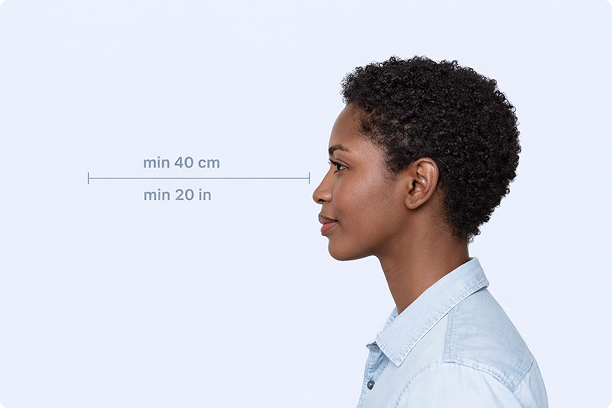
Correct Distance
Hold your camera at arm's length (40cm/20in minimum) for the best results
_1768770085753-BWkNoFUp.jpg)
Face The Camera
Look straight at the camera with a neutral expression and eyes open
Even Lighting
Use natural light or soft indoor lighting to avoid shadows on your face
What You Get
Digital Photo
High-resolution JPEG for online applications
Print-Ready PDF
4x6 inch PDF with multiple copies and cut guides
Acceptance Guarantee
Full refund if your photo is rejected
Why Choose PassportApp?
Ready in 30 Seconds
Fast AI processing delivers your photo instantly.
Money Back Guarantee
Full refund if your application is rejected due to the photo.
Compliance Verified
Each photo is checked against official requirements.