
UK Passport Photo Requirements at a Glance
| Requirement | Specification | ||
|---|---|---|---|
| ------------ | -------------- | ||
| Print size | 35mm wide × 45mm tall | ||
| Digital size | At least 600 × 750 pixels · JPEG · 50KB–10MB | ||
| Head height | 29–34mm chin to crown (70–80% of the photo height) | ||
| Background | Plain cream or light grey — no shadows, patterns or objects | ||
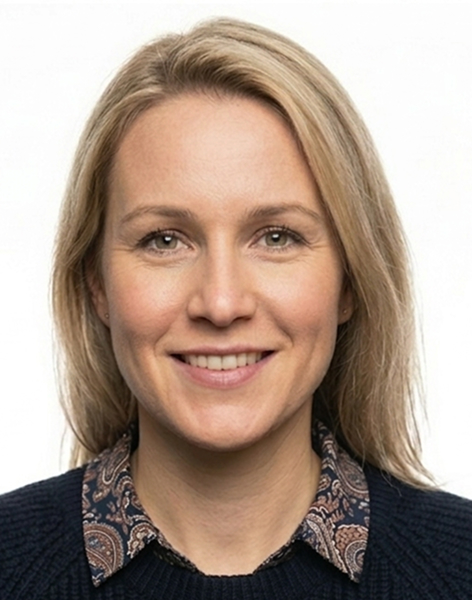
| Expression | Neutral — mouth closed, eyes open, looking directly at the camera | ||
| Head position | Facing forward, no tilt, no turn — head centred | ||
| Glasses | Not permitted (ban in force since November 2022) | ||
| Recency | Taken within the last month | ||
| Head coverings | Religious or medical reasons only — full face must be visible | ||
| Colour | Colour photograph only — no filters, no editing | ||
| Paper applications | 2 identical prints on photo-quality paper, no border | ||
| Online applications | Digital file only — no prints. Photo code (IDPC) required |
Source: GOV.UK — Get a passport photo (HMPO, updated April 2026).
Printed Photos or Digital — Which Rules Apply to You
Most people applying for a UK passport today apply online. Online applications use a digital photo only — you never submit printed photos. The two identical 35×45mm prints that people associate with passport photos are required only if you're applying using a paper form (the LS01 application form), which is a relatively small proportion of applications now.
It's worth knowing which you're doing before you get your photos taken, because some requirements only apply to one or the other. A digital file needs to be JPEG format and between 50KB and 10MB. A printed photo needs to be on proper photo-quality paper, have no border, and be free of creases or marks. Both need to be taken within the last month, meet the same size and framing requirements, and show your face in the same way.
For online applications, you'll be asked to enter a photo code — sometimes called an IDPC or digital photo code — rather than upload a file directly. You get this code from a verified photo provider. The code links your photo to your application automatically. If you're taking a photo yourself during the online application process, the GOV.UK system handles the upload, but GOV.UK's own guidance notes that photos from a booth or shop are more likely to be approved than self-taken ones.
Size and Head Height
Printed passport photos must be exactly 35mm wide by 45mm tall. That's the standard size used in photo booths across the UK. The photo cannot be cut down from a larger picture, and it cannot have any border or frame around it. For digital submissions, the image must be at least 600 pixels wide by 750 pixels tall, in JPEG format, and between 50KB and 10MB.
The overall photo size is only half the requirement. The image of your head — measured from the bottom of your chin to the crown of your head — must be between 29mm and 34mm in the printed version. That works out to roughly 70 to 80 per cent of the photo height. This is the requirement most people don't know about and the one most responsible for rejections.
Why the head size matters
UK passports are biometric documents. The facial recognition system used at UK borders works by measuring the distances between specific points on your face — eyes, nose, mouth, jaw — and comparing them to the measurements stored when your passport was issued. If your head is too small in the photo, those measurements become less precise. A head that's only 25mm in the frame gives the system less to work with than one at 32mm, and HMPO's automated checker will flag it.
Selfies taken at arm's length almost always produce a head that's too small. The phone is too far away, and even if the photo looks fine on a small screen, the head occupies too little of the actual frame. The fix is straightforward: prop the phone against something solid and step back to get the framing right, or have someone else take the photo. Your head and the top of your shoulders should fill most of the frame.
Background
The background must be plain cream or light grey. Those are the two colours HMPO specifies. Plain white is technically accepted but it's the wrong choice in practice — the automated checker on the GOV.UK online application uses edge detection to identify the outline of your face and shoulders, and a bright white background against pale skin provides very little contrast for that process. Cream or light grey gives a clean, distinct edge between you and the background.
The background must be completely uniform — no texture, no visible pattern, no objects, and no shadows. The two shadow problems people run into are different from each other. The first is a shadow falling on your face, usually caused by a ceiling light directly above you throwing shadow under your nose, chin, and brow. The second is a shadow on the wall behind you, caused by standing too close to it. Stand at least half a metre from the wall — ideally closer to a metre — and use natural daylight from a window to the side rather than overhead lighting.
Expression and Head Position
The requirement is a neutral expression with your mouth closed and your eyes fully open, looking directly at the camera. No smile, no frown, no raised eyebrows. This isn't arbitrary — biometric face matching works by measuring the geometry of your face, and even a slight smile shifts that geometry enough to cause problems. The corners of the mouth rise, the cheeks lift slightly, the eyes narrow fractionally. It's not visible to you in the mirror but the automated checker measures it.
The expression to aim for is genuinely neutral rather than strained. Trying hard not to smile sometimes produces a look that reads as tense, which can be just as much of a problem. Think of the expression you'd have if someone asked you a question you were considering — somewhere between attentive and entirely blank.
Your head needs to face directly forward with no tilt to either side, no chin up or down, and no turning. The camera should be at roughly the same height as your eyes. If the camera is above you and you're looking up at it, your face appears foreshortened in a way that can affect the biometric measurements.
Glasses
Glasses are not permitted in UK passport photos. The ban has been in force since November 2022. Before then, glasses were allowed provided your eyes were fully visible and there was no glare or reflection from the lenses. That concession no longer exists.
The only exception is a documented medical requirement. If you genuinely cannot remove your glasses, you need written confirmation from a doctor stating why, and that letter must be submitted alongside your application. Sunglasses are never permitted under any circumstances, and tinted or coloured lenses are not permitted either.
A large number of people who last renewed their passport four or five years ago are unaware the rules changed. If your current passport photo has glasses in it, your new photo cannot.
How Recent the Photo Needs to Be
Your passport photo must have been taken within the last month. The UK's recency rule is considerably stricter than most other countries — the United States allows photos up to six months old, and most European countries do the same. HMPO's position is that the photo needs to be a current likeness, and a month is the window they've set for that.
In practice this means the photo needs to be taken within a few days of you submitting your application, not weeks in advance. HMPO rejects photos taken more than about four to five weeks before the application date. Don't reuse a photo from a previous application, even if it was never used. Don't use a photo from a professional shoot that happened to be taken two months ago.
What the Automated Photo Checker Looks For
The GOV.UK online passport application runs every submitted photo through an automated checker before accepting it. This checker is stricter than the manual review that used to happen at post office counters, and it's why photos that might have been waved through a few years ago are now being rejected.
The checker looks at several things: whether the head is the right size and properly centred; whether the background is sufficiently light and free from shadow; whether there is shadow on the face; whether the face is looking directly at the camera; whether the image is sharp and in focus; and whether the file meets the technical specifications. It does not see what you see when you look at a photo casually — it takes measurements and compares them to expected values.
The most common automated rejection is a head that's slightly below the 29mm minimum. The second most common is a shadow — either on the face or on the background. Both of these are invisible to most people looking at a photo on a phone screen, which is why so many photos that look fine fail the check. Running a photo through a compliance checker before uploading it to GOV.UK removes that uncertainty.
Baby and Child Passport Photo Rules
The rules for babies and children follow the same principles as adult photos but with several important relaxations. HMPO accepts that asking a young child to hold a specific expression and look directly at a camera is not realistic.
Babies under one year old
Babies under one do not need to have their eyes open. Their expression and head position are also not restricted in the way adult photos are. The recommended method is to lay the baby flat on a plain light-coloured sheet — not a patterned one — and take the photo from directly above, looking straight down. You can support the baby's head with your hand to keep it facing upward, but your hand must not be visible in the photo. No dummies, no toys, and no other person in the frame.
Children under six
Children under six do not need to look directly at the camera and do not need to hold a neutral expression. All other requirements apply — the background must be plain and light, the child must be on their own in the photo, and the photo must be in colour and taken within the last month.
Children six and over
Children aged six and over are held to the same requirements as adults. They need to face the camera directly, hold a neutral expression with their mouth closed, and have their eyes open and visible. The size and background requirements are identical to adult photos.
For all child passport photos, the child must be the only subject in the picture. No parent, sibling, or supporting hand should be visible. For babies where head support is needed, use a rolled blanket rather than a hand if possible — it avoids the risk of a hand appearing at the edge of the frame.
The Rules People Most Often Get Wrong
Most passport photo rejections come down to a small number of recurring problems. Knowing which ones they are means you can check for them specifically before submitting rather than finding out afterwards.
Head too small
The single most common issue. The 29mm minimum head height sounds technical but it just means your head needs to fill about three quarters of the photo frame. Arm's-length selfies consistently fail this. Prop the camera against something and step back.
Shadow on face or background
Two separate problems, both common. Shadow on the background comes from standing too close to the wall — move further away. Shadow on the face comes from overhead lighting — face a window and use natural daylight instead.
Wrong background colour
Pure white walls photograph well but cause problems with the automated edge detection. Cream or light grey gives cleaner results. Textured walls, patterned wallpaper, or anything visible behind you is an automatic failure.
Photo older than a month
People reuse photos from previous applications, from professional shoots, or from occasions where they happened to have a good photo taken. The one-month limit is strict and strictly enforced. Take a new photo close to the date of your application.
Slight smile
Looks completely natural on screen and to the naked eye. Gets flagged reliably by the automated checker. Go genuinely neutral.
Glasses left on
The November 2022 ban catches people who haven't renewed recently. Glasses off, no exceptions unless you have a doctor's letter.
Ready to create your passport photo?
Get a compliant passport photo in minutes. AI-verified. 100% acceptance guarantee or your money back.
Why Choose PassportApp?
Ready in 2 Minutes
AI processing delivers your compliant photo instantly — no booth queues.
100% Acceptance Guarantee
Full refund if your application is rejected due to the photo.
Compliance Verified
Every photo is checked against official requirements before download.
Frequently Asked Questions
Related Tools
Explore all UK passport photo guides
Where to get your photo
How-to guides
- How to Take a Passport Photo
- Why Passport Photos Get Rejected
- Passport Photo Rejected? What to Do Next
- Baby Passport Photo Rules
- Passport Photo Glasses Rules
- Passport Photos Near Me
- How Much Does a Passport Photo Cost?
- Digital Passport Photo Guide
- Online Passport Photo Maker
- Passport Photo Booth Near Me
- iPhone British Passport Photo
Passport photos by city
- Passport Photos in London
- Passport Photos in Birmingham
- Passport Photos in Manchester
- Passport Photos in Edinburgh
- Passport Photos in Bristol
- Passport Photos in Liverpool
- Passport Photos in Leeds
- Passport Photos in Glasgow
- Passport Photos in Sheffield
- Passport Photos in Cardiff
- Passport Photos in Newcastle
- Passport Photos in Nottingham
- Passport Photos in Southampton
- Passport Photos in Coventry